Free Delivery on Purchases Over RM 500 | Excludes East Malaysia, East Coast & Outskirt Areas






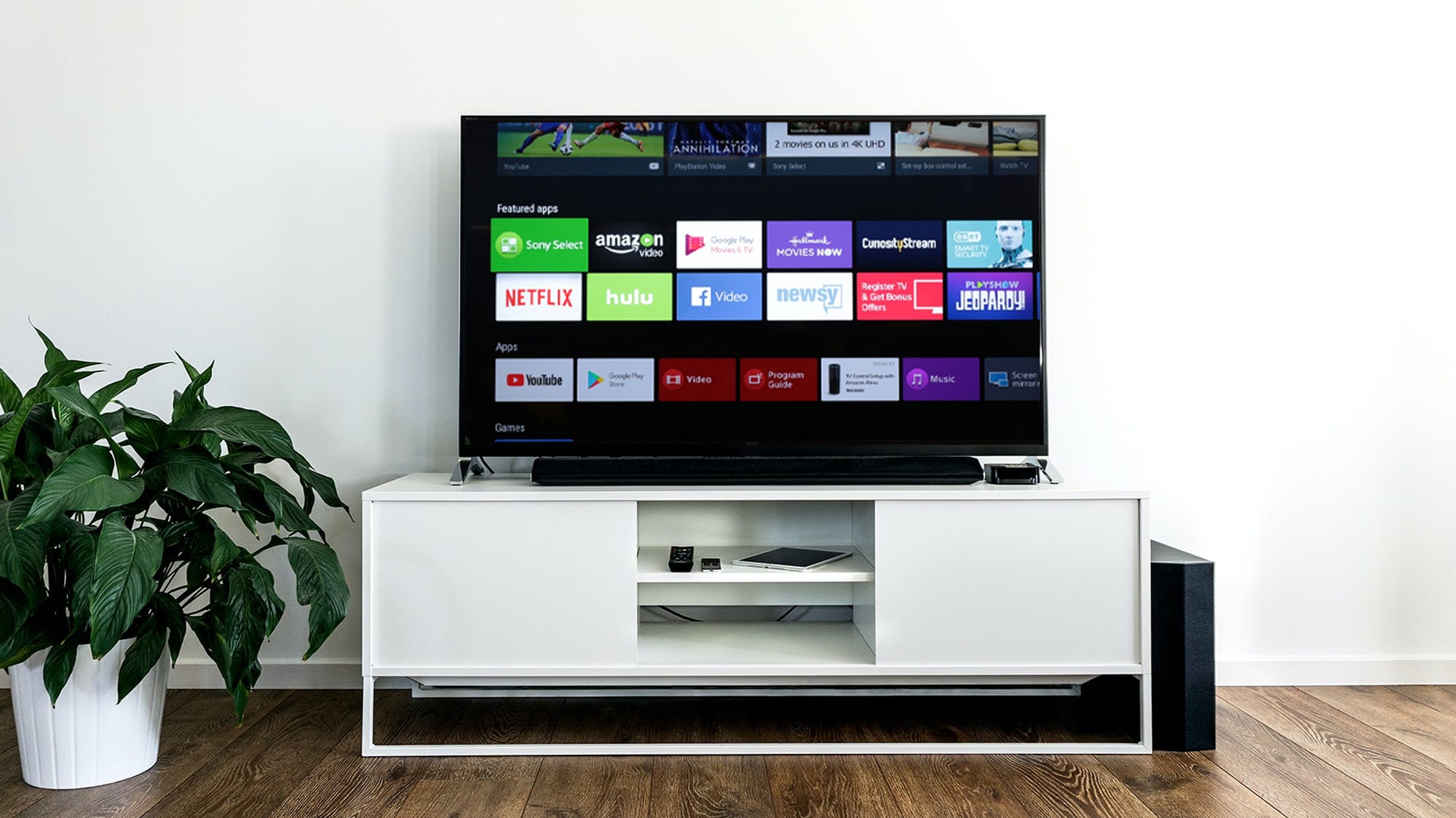

QLED vs OLED vs UHD
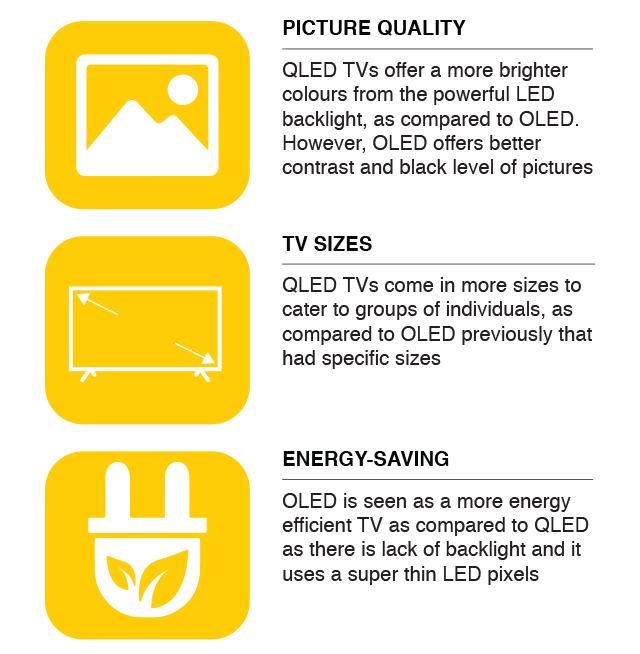
Breaking it own, it stands QLED stands for Quantum dots Light Emitting Diode, where it uses tiny particles called quantum dots where when it is hit by light from the TV's LED backlight, it produces a bright and light colours.
OLED (known as Organic Light-Emitting Diode) on the other hand produces its own light with each dot. It does not use an LCD. Both are a new type of technology for TVs. An OLED is a thin and light in weight TV, which eases the use of customers when handling it.
Breaking it own, it stands QLED stands for Quantum dots Light Emitting Diode, where it uses tiny particles called quantum dots where when it is hit by light from the TV's LED backlight, it produces a bright and light colours.
OLED (known as Organic Light-Emitting Diode) on the other hand produces its own light with each dot. It does not use an LCD. Both are a new type of technology for TVs. An OLED is a thin and light in weight TV, which eases the use of customers when handling it.
However, a UHD TV operates like a QLED TV in that it has an LED backlight and LCD
screen, but it
does not have QLED's quantum dots to improve the colour and brightness of the
picture shown. To
avoid misconcepts, a UHD TV is basically a TV with a higher resolution, but it is
far from the
new technology of QLED and OLED.
Highlights:

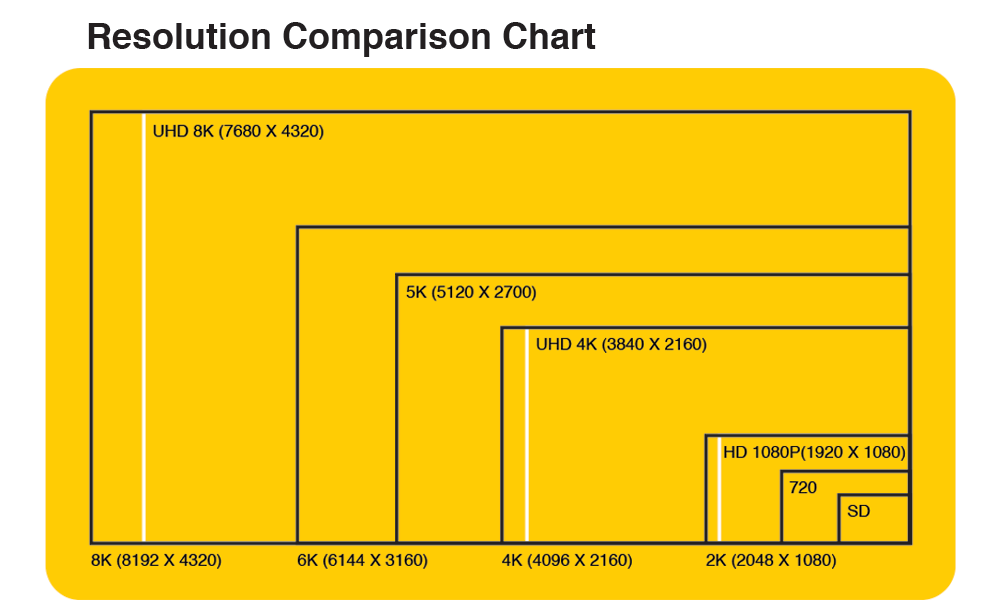
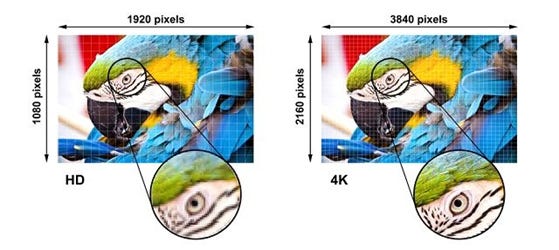
A TV's resolution is defined by the amount of horizontal and vertical pixels.
For 1080p TVs and lower, the resolution refers to the number of vertical pixels, while 4k and 8k TVs mean they have nearly 4,000 and 8,000 horizontal pixels, respectively.
Higher-resolution displays allow you to see more fine details in your favorite games, movies, and TV shows.
While the resolution isn't the only aspect of picture quality, it's important, and most people can easily notice and appreciate the difference between a high-resolution TV and a low-resolution one, especially if they're sitting up close.
For 1080p TVs and lower, the resolution refers to the number of vertical pixels, while 4k and 8k TVs mean they have nearly 4,000 and 8,000 horizontal pixels, respectively.
Higher-resolution displays allow you to see more fine details in your favorite games, movies, and TV shows.
While the resolution isn't the only aspect of picture quality, it's important, and most people can easily notice and appreciate the difference between a high-resolution TV and a low-resolution one, especially if they're sitting up close.
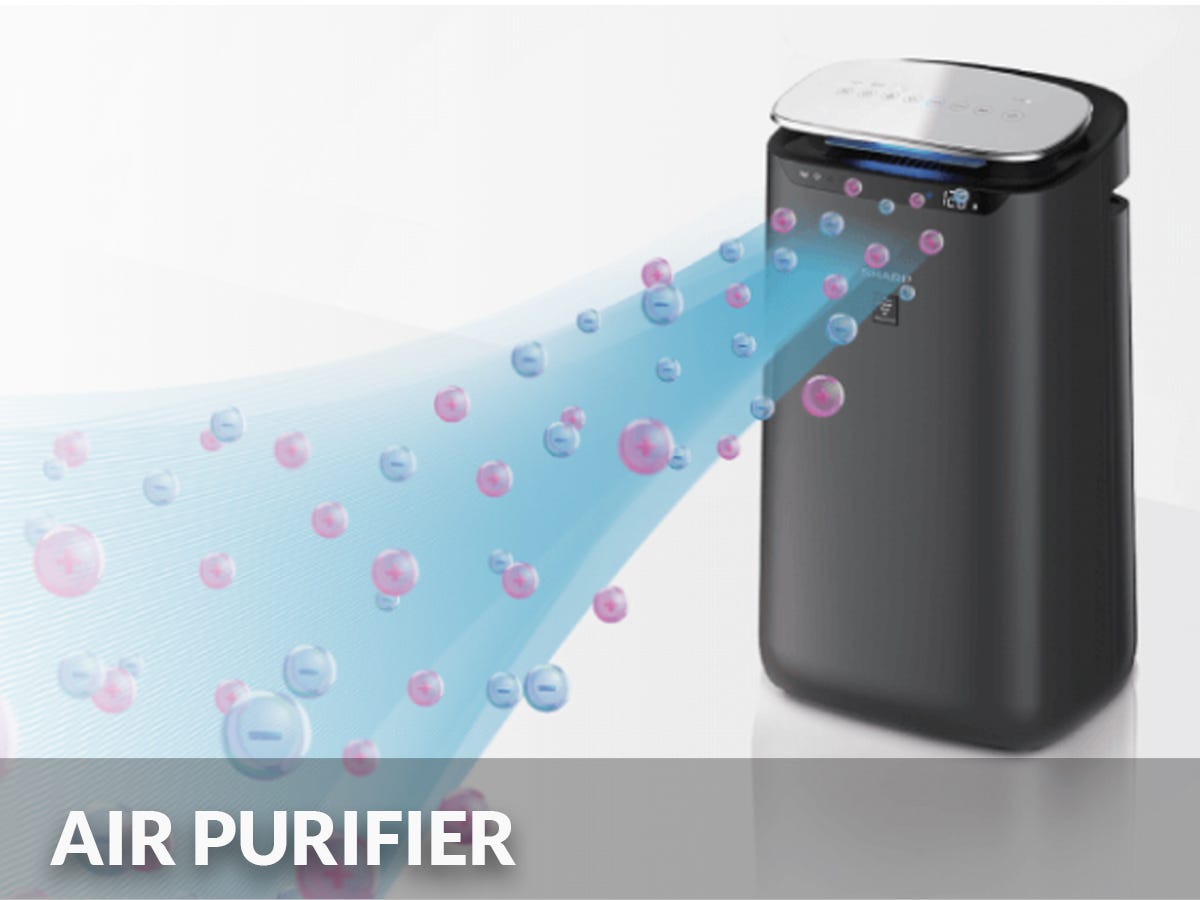
Helps clean the air to keep it pure and safe

How Do Air Purifiers Work?
With many allergens, like smoke, pollen, bacteria, viruses, pet dander, and other pollutants, an air purifier helps to cleanse the indoor air. This involves elimating or filtering out those allergens and pollutants mentioned to avoid allergics and asthma.
The fine sieve inside an air purifier would filter out the mentioned particles or other pollutants by trapping it, while releasing the good air. It sanitises the air, acting as an opposite of other air treatment which adds particles to the indoor air.
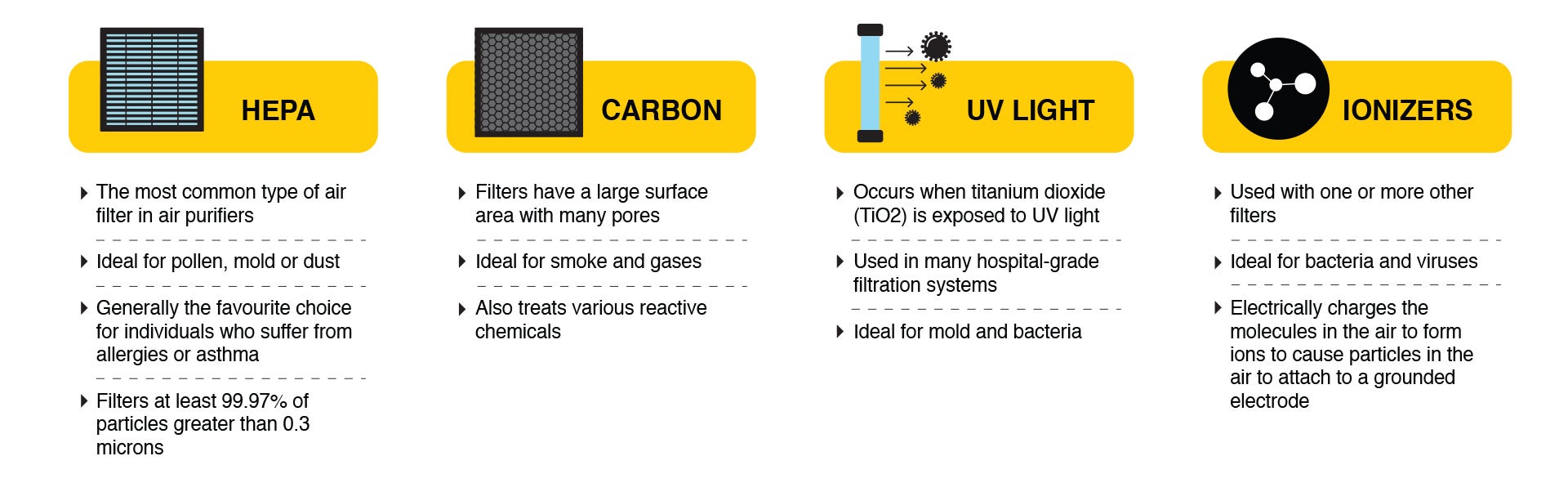
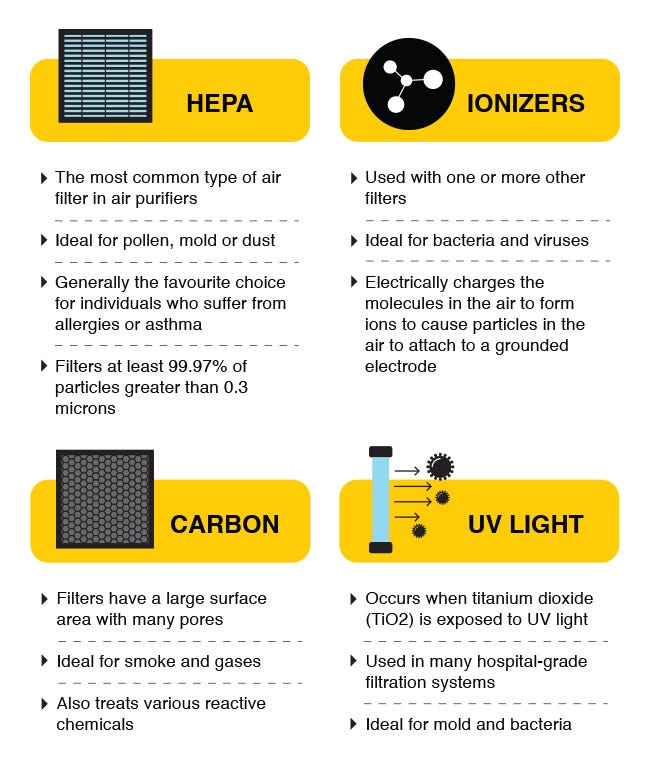
Particles smaller than 10 micrometer or microns is not visible to the naked eyes, hence the use of air filter. High Effieciency Particulate Air (HEPA) are common filters used to trap 99.97% of airborne particles larger than the size of 0.3 microns (1 micrometer is equivalent to 0.000039 inch).
Choosing the Right Air Purifier for Your Room Size
The room capacity of a High Efficiency Particulate Air (HEPA) air purifier is a determinant on whether it can satisfy one's air purifying needs.
With many allergens, like smoke, pollen, bacteria, viruses, pet dander, and other pollutants, an air purifier helps to cleanse the indoor air. This involves elimating or filtering out those allergens and pollutants mentioned to avoid allergics and asthma.
The fine sieve inside an air purifier would filter out the mentioned particles or other pollutants by trapping it, while releasing the good air. It sanitises the air, acting as an opposite of other air treatment which adds particles to the indoor air.
Particles smaller than 10 micrometer or microns is not visible to the naked eyes, hence the use of air filter. High Effieciency Particulate Air (HEPA) are common filters used to trap 99.97% of airborne particles larger than the size of 0.3 microns (1 micrometer is equivalent to 0.000039 inch).
Choosing the Right Air Purifier for Your Room Size
The room capacity of a High Efficiency Particulate Air (HEPA) air purifier is a determinant on whether it can satisfy one's air purifying needs.

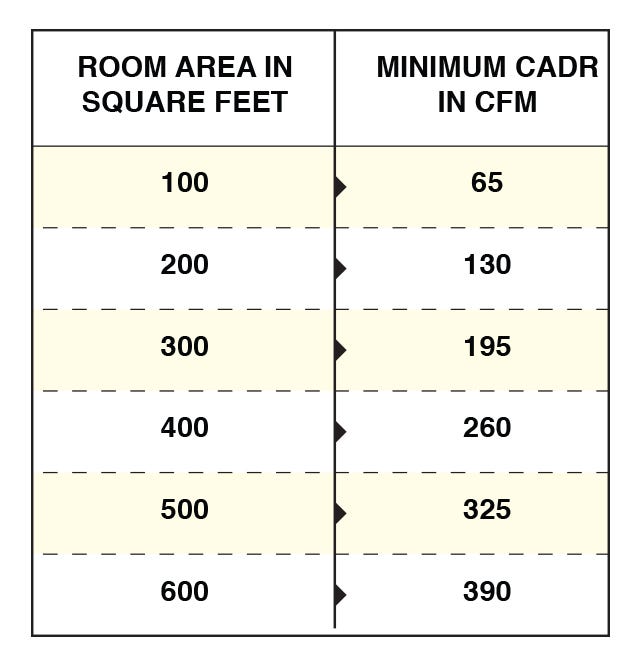
* Formulas: Room Area in Square Feet = (L x W) feet
CADR, or Clean Air Delivery Rate = [(ACH x Square Feet x H) / 60] CFM
ACH, or Air Changes per Hour = It is selected based on your own desire. The higher the ACH number, the faster the air cleaning in the particular area.
For better experience, below is the list of minimum selection for different purpose:
2 ACH = Normal air cleaning | 5 ACH = Allergy and asthma | 8 ACH = Smoky or heavily polluted air
* For those with a coverage area provided, it is important to measure the room size and purchase the air purifier accordingly to get the most out of its effectiveness.
CADR, or Clean Air Delivery Rate = [(ACH x Square Feet x H) / 60] CFM
ACH, or Air Changes per Hour = It is selected based on your own desire. The higher the ACH number, the faster the air cleaning in the particular area.
For better experience, below is the list of minimum selection for different purpose:
2 ACH = Normal air cleaning | 5 ACH = Allergy and asthma | 8 ACH = Smoky or heavily polluted air
* For those with a coverage area provided, it is important to measure the room size and purchase the air purifier accordingly to get the most out of its effectiveness.
Cost-Saving Feature!
Washable filters are available for some air purifiers, promoting cost-effeciency. It is not just reusable, but also easy to clean. It helps save money and time in the long-run.
Washable filters are available for some air purifiers, promoting cost-effeciency. It is not just reusable, but also easy to clean. It helps save money and time in the long-run.


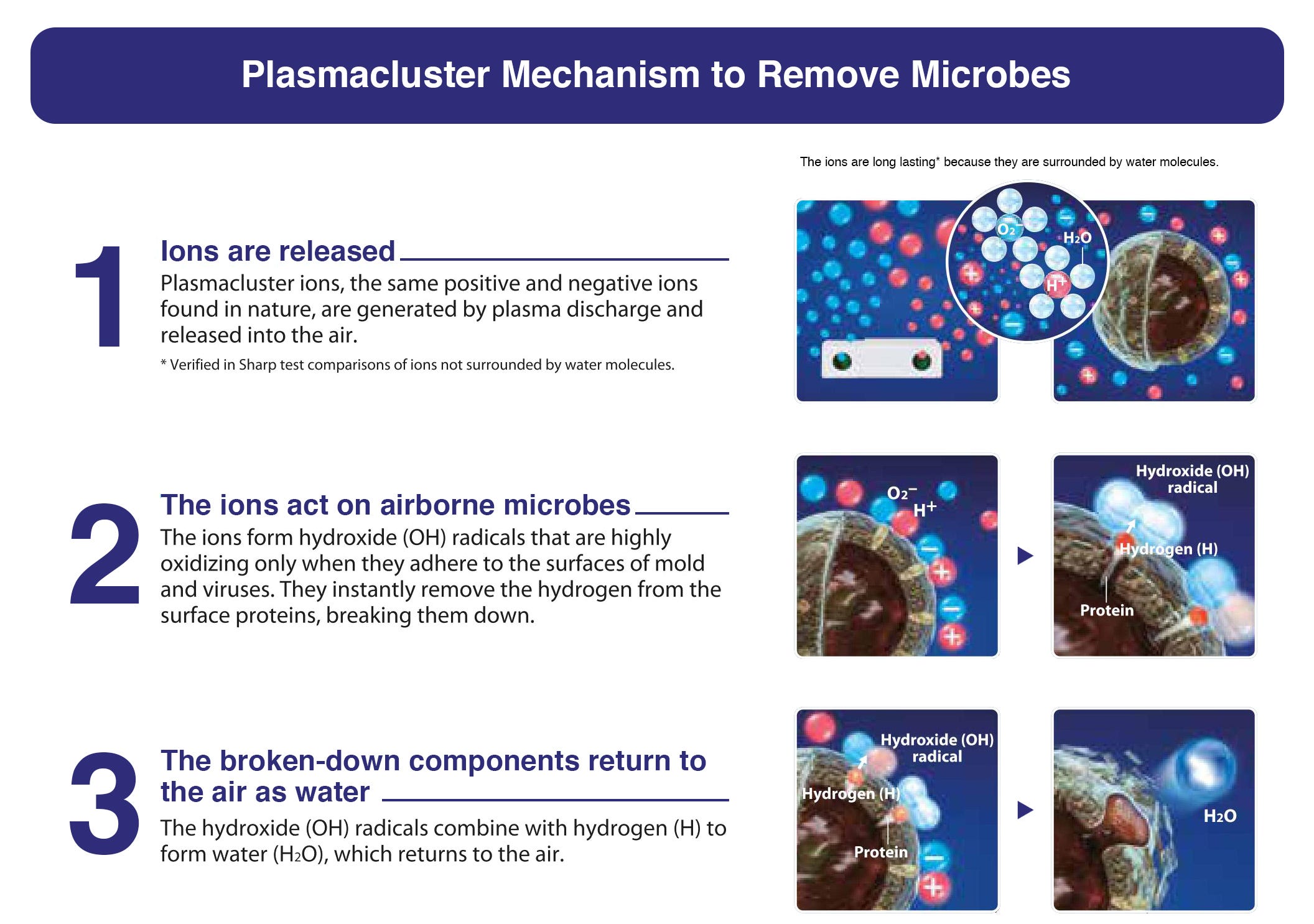
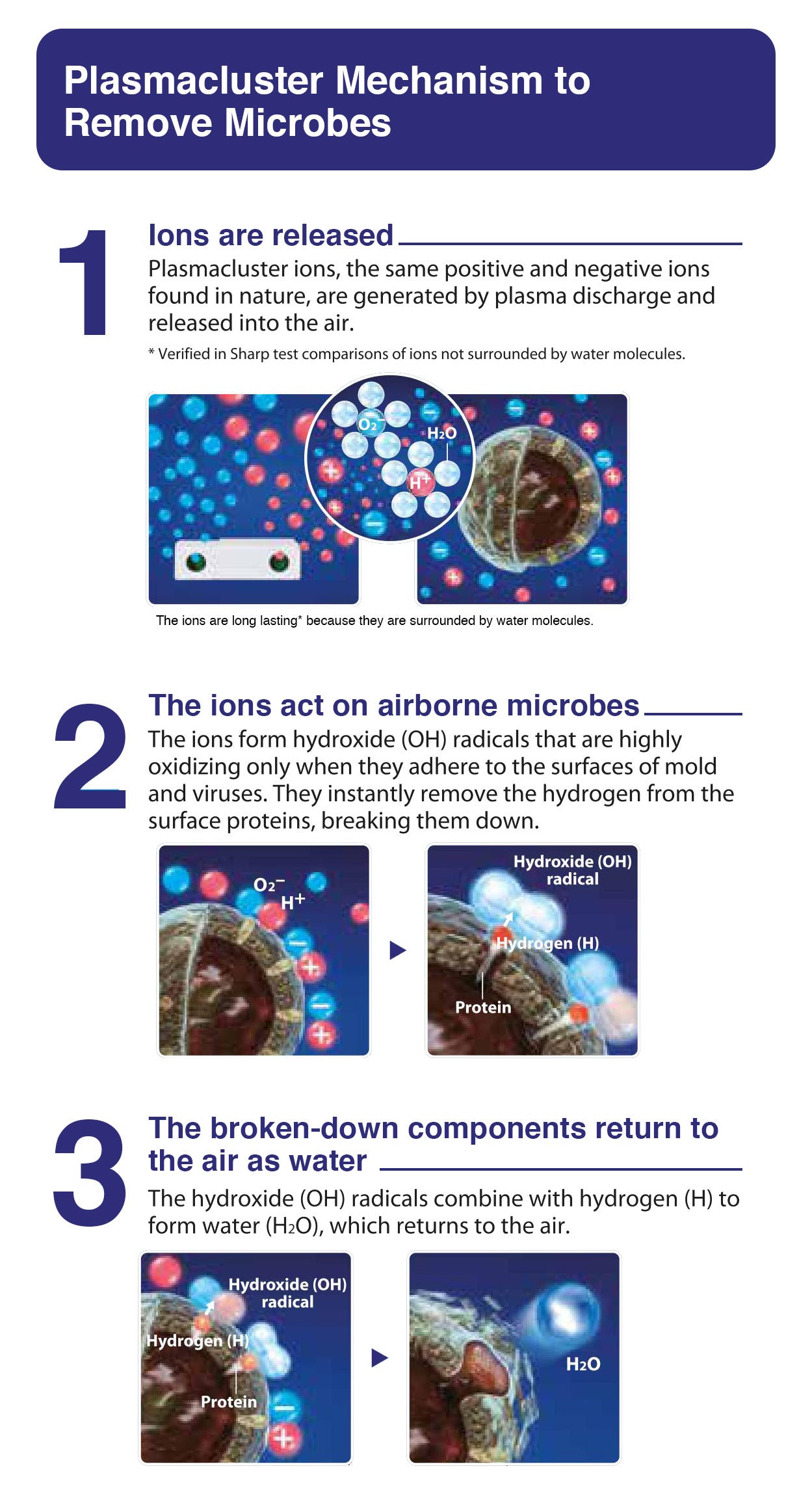
With Sharp’s proprietary Plasmacluster ion (PCI) technology,
positive and negative ions are discharged when the air purifier
is switched on.
These ions deactivate airborne contaminants by attaching to them
while extracting a hydrogen compound to break down the protein
membrane, resulting in water molecules, which are returned to the air.
Plasmacluster Technology emits more positive and negative ions in a room than even those found in a forest. It is proven to be safe and highly effective, no matter how high the ions' density is.
Plasmacluster Technology emits more positive and negative ions in a room than even those found in a forest. It is proven to be safe and highly effective, no matter how high the ions' density is.
- *Plasmacluster is thus increasingly finding applications in various areas of activity, such as in businesses, in addition to household use.
High Density 7000, 25000 & 50000 (NEXT)+
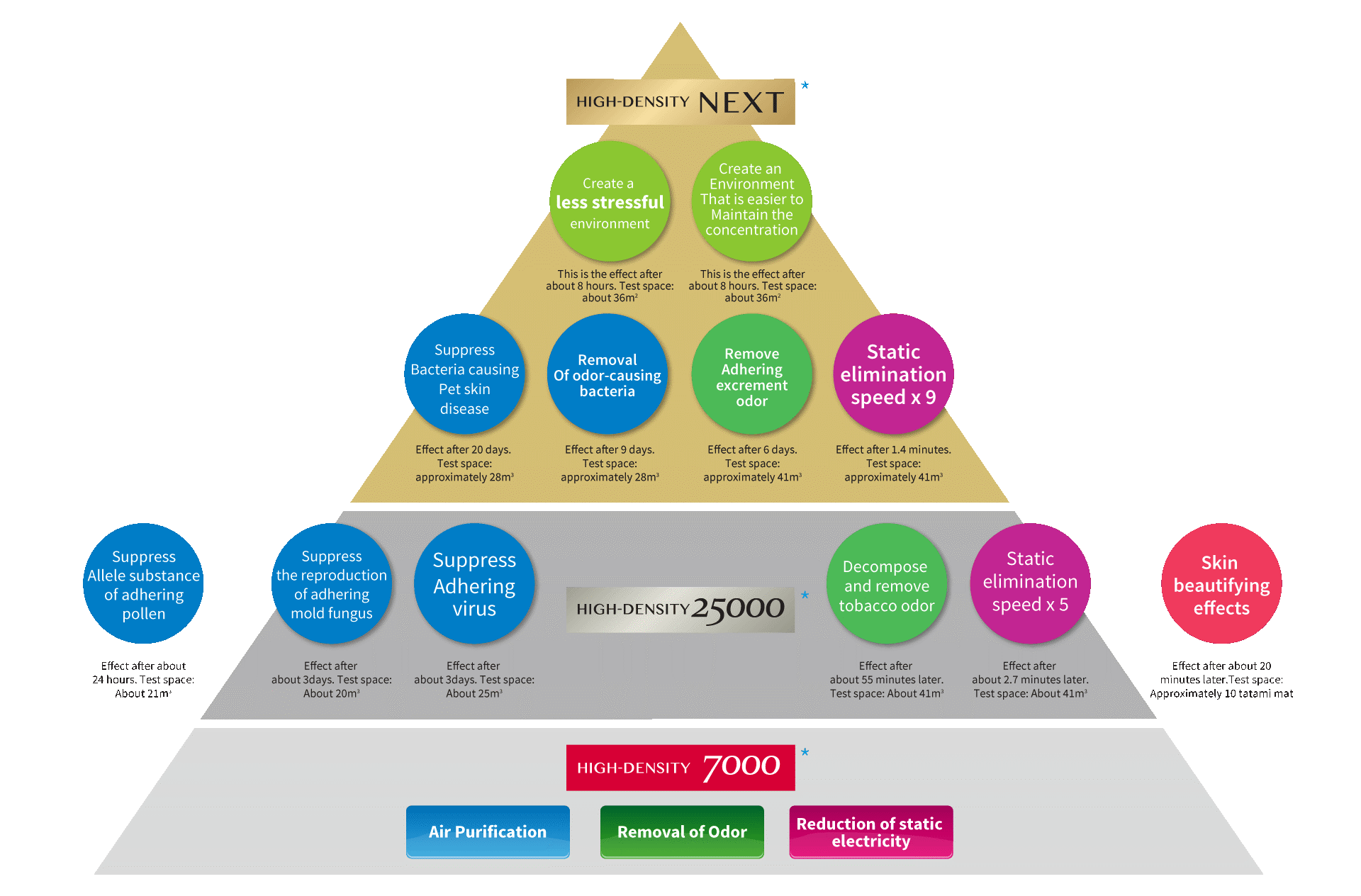
Different ion density provides different level of benefits.
Plasmacluster air purifier with ion density 7000 can purify the air,
remove odors, and reduce static electricity.
Meanwhile, Plasmacluster air purifier with ion density 25000 can do a lot more than purifiers with ion density 7000.
The functions include but are not limited to air purifying, odors removal, and static electricity reduction. Also, it is capable of suppressing the adhering viruses, mold fungus, and pollens. Strong odors like tobacco can be removed as well.
This kind of air purifiers tends to have a 5x elimination speed compared to those with ion density 7000, thus making skin-beautifying effective.
High-Density NEXT purifiers are way more powerful. It produces ion density 50,000. Other than the listed effects above, these purifiers can create a less stressful environment that is easier to maintain the ions' concentration. Pet owners are advised to have a purifier with High-Density NEXT in home since they can suppress bacteria that cause pet skin disease. Removal of odor-causing bacteria and adhering excrement odor are also what High-Density NEXT purifiers are capable of.
In conclusion, these purifiers have more purification ability compared to Plasmacluster air purifiers with ion density 7000.
Meanwhile, Plasmacluster air purifier with ion density 25000 can do a lot more than purifiers with ion density 7000.
The functions include but are not limited to air purifying, odors removal, and static electricity reduction. Also, it is capable of suppressing the adhering viruses, mold fungus, and pollens. Strong odors like tobacco can be removed as well.
This kind of air purifiers tends to have a 5x elimination speed compared to those with ion density 7000, thus making skin-beautifying effective.
High-Density NEXT purifiers are way more powerful. It produces ion density 50,000. Other than the listed effects above, these purifiers can create a less stressful environment that is easier to maintain the ions' concentration. Pet owners are advised to have a purifier with High-Density NEXT in home since they can suppress bacteria that cause pet skin disease. Removal of odor-causing bacteria and adhering excrement odor are also what High-Density NEXT purifiers are capable of.
In conclusion, these purifiers have more purification ability compared to Plasmacluster air purifiers with ion density 7000.
* Note: Above data are verified under the test condition.
The effects may differ depending on the actual usage/environment.
* The number in this technology mark indicates an approximate number of ions supplied into air of 1 cm3, which is measured around the centre of the applicable room floor area (at 1.2 m height above the floor) when the product is placed close to a wall at the MED mode setting.
* The number in this technology mark indicates an approximate number of ions supplied into air of 1 cm3, which is measured around the centre of the applicable room floor area (at 1.2 m height above the floor) when the product is placed close to a wall at the MED mode setting.
Plasmacluster Technology has been Applied in a Wide Range
of Location and Industries
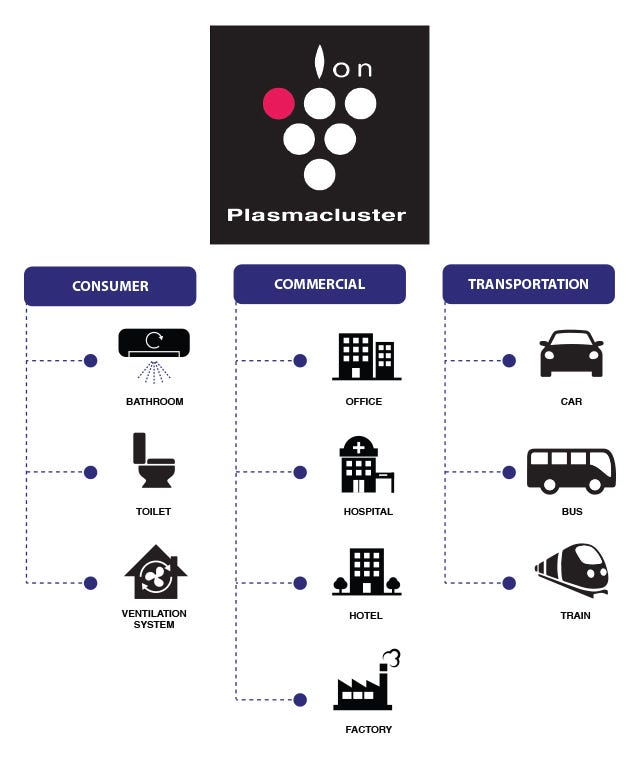
Plasmacluster technology is recognized and used across a wide range of industries. Sharp has expanded the Plasmacluster Ion technology to the following industries:
Plasmacluster technology is recognized and used across a wide range of industries. Sharp has expanded the Plasmacluster Ion technology to the following industries:
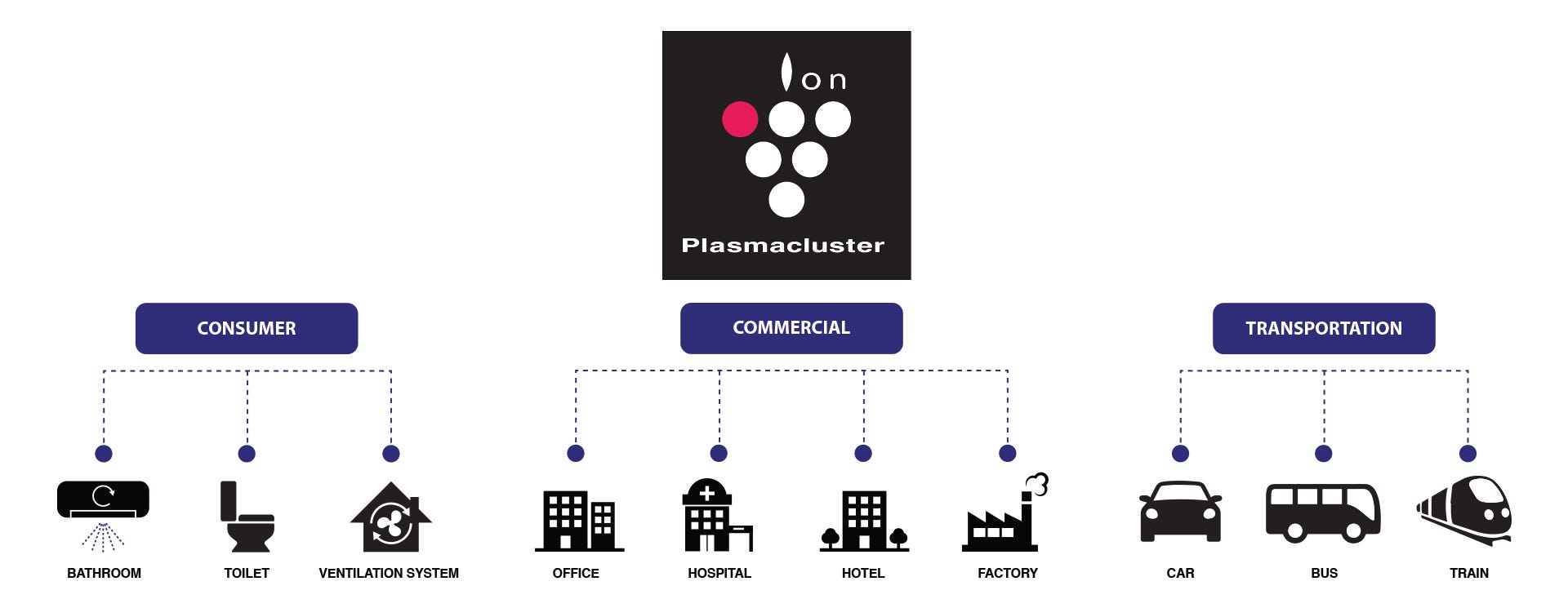
- Plasmacluster provides you with natural and safe air. This unique technology from Sharp applies the power of nature.
Solutions for All Air-quality Concerns
Plasmacluster Ions Clean the Room Air
Test results have proved all Plasmacluster Ions can remove airborne mold and allergens. Also, it can effectively reduce the growth of adhering mold in your house as well.
Plasmacluster Ions Clean the Room Air
Test results have proved all Plasmacluster Ions can remove airborne mold and allergens. Also, it can effectively reduce the growth of adhering mold in your house as well.
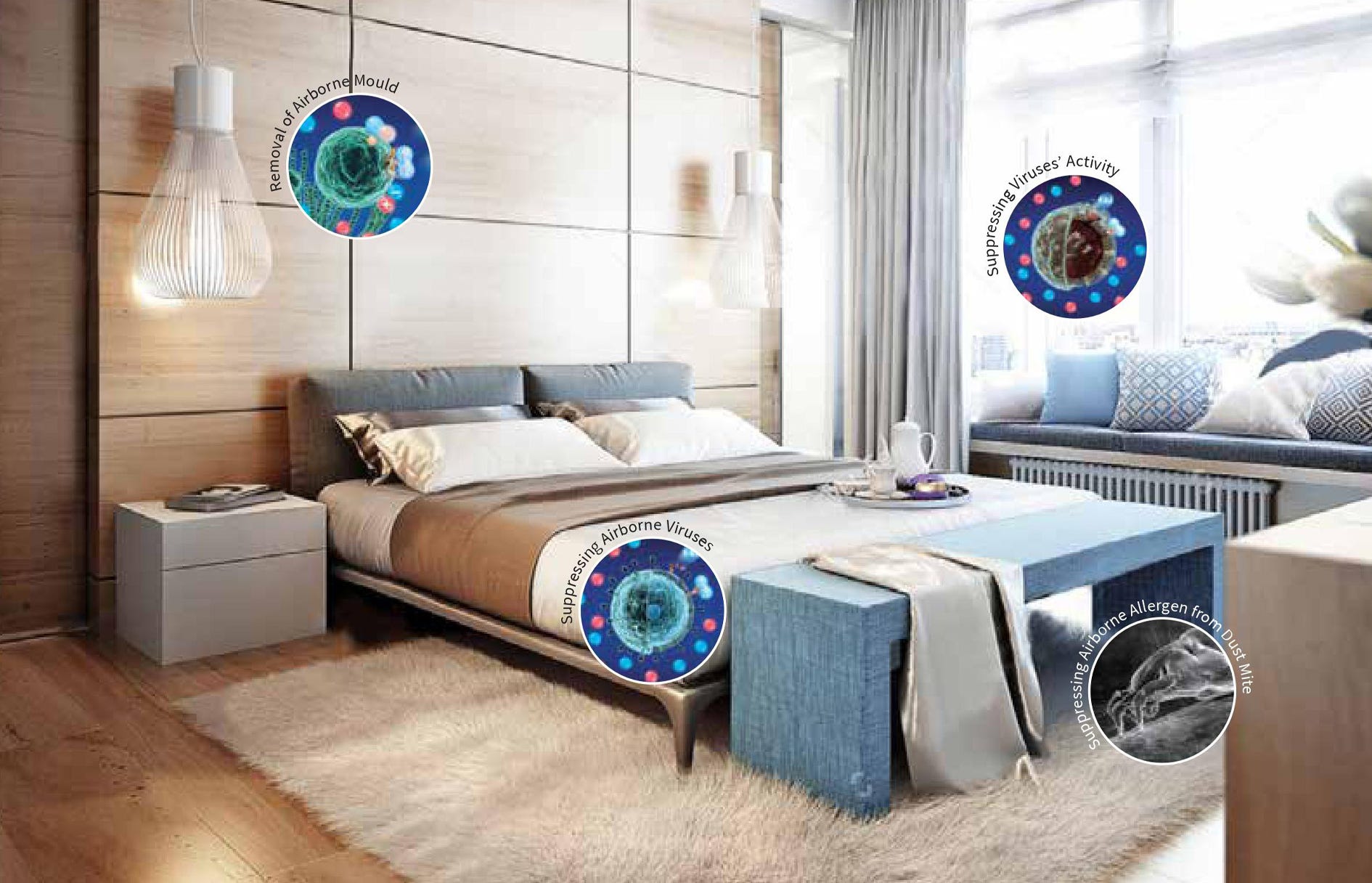
Suppressing the Activity of Airborne, Adhering Viruses and Microbes
Viruses and microbes are the things that parents worry about the most as they will negatively affect children and oldies' health.
Tested by Pasteur Institute in Ho Chi Minh City, Vietnam, Shokukanken Inc., and Japan Food Research Laboratories, all the three experiments concluded a 99% reduction of airborne and adhering viruses and microbes.
Removing Stubborn Odors
Plasmacuster Ions air purifier can deodorize sweat odor clinging to clothing in approximately six hours. Also, it can deodorize damp smell on clothes that drying indoors in around three hours.
Reduction of Static Electricity
Were you always annoyed by the sudden 'shock' feeling when touching your family or wearing a cloth? That's static charges! Our purifier can reduce static electricity that annoys you.
Skin-Beautifying Effects
The test result showed an effect of providing luster to skin after 20 minutes of SHARP air purifier operation.
Viruses and microbes are the things that parents worry about the most as they will negatively affect children and oldies' health.
Tested by Pasteur Institute in Ho Chi Minh City, Vietnam, Shokukanken Inc., and Japan Food Research Laboratories, all the three experiments concluded a 99% reduction of airborne and adhering viruses and microbes.
Removing Stubborn Odors
Plasmacuster Ions air purifier can deodorize sweat odor clinging to clothing in approximately six hours. Also, it can deodorize damp smell on clothes that drying indoors in around three hours.
Reduction of Static Electricity
Were you always annoyed by the sudden 'shock' feeling when touching your family or wearing a cloth? That's static charges! Our purifier can reduce static electricity that annoys you.
Skin-Beautifying Effects
The test result showed an effect of providing luster to skin after 20 minutes of SHARP air purifier operation.

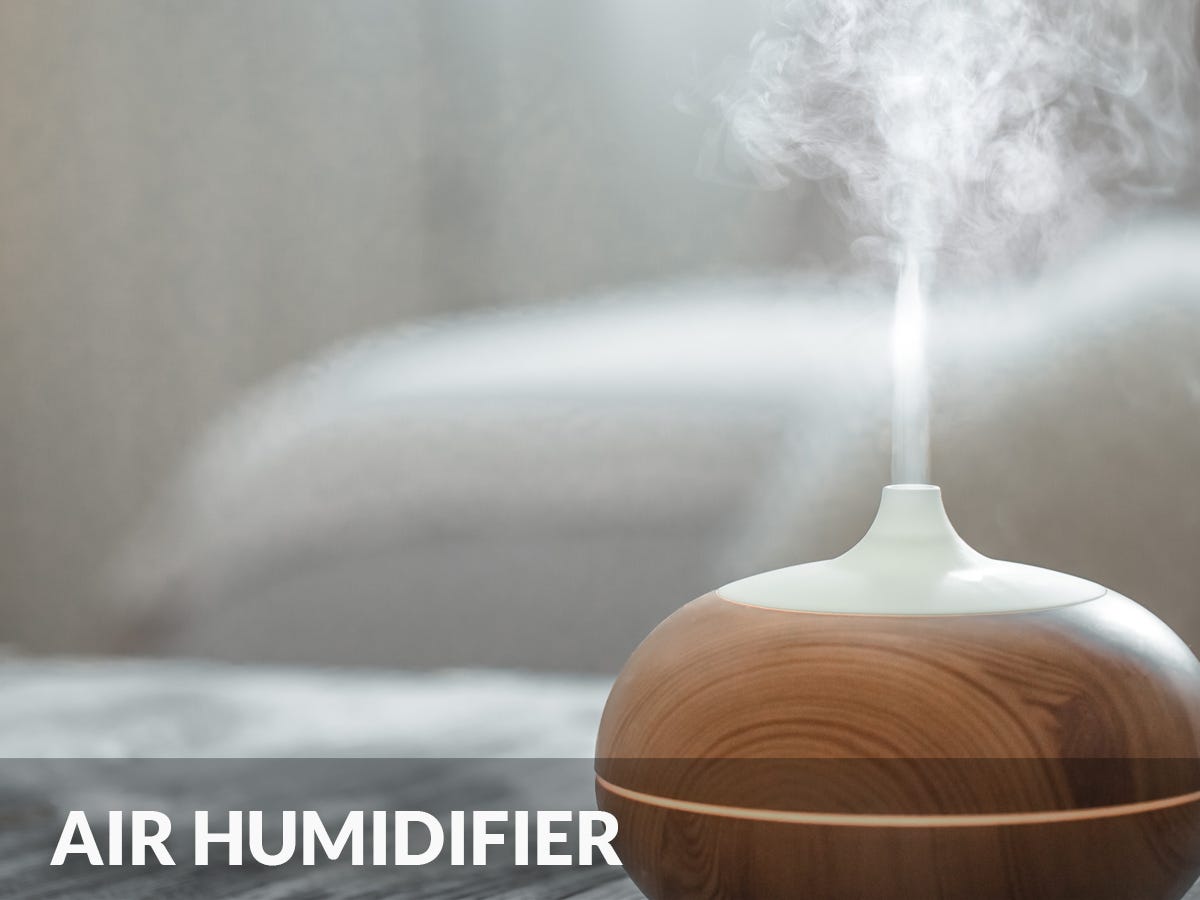
Can increase the humidity and moisturises the air of the surrounding

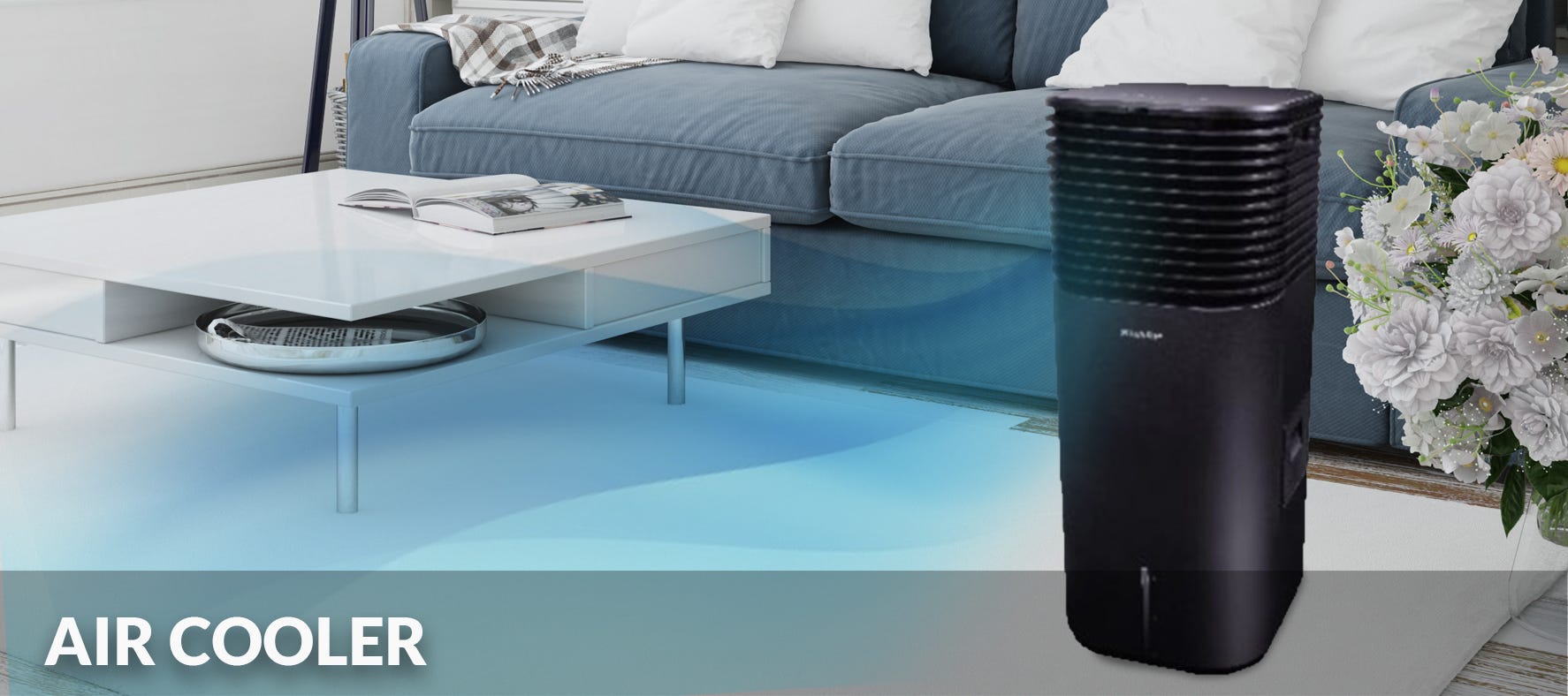
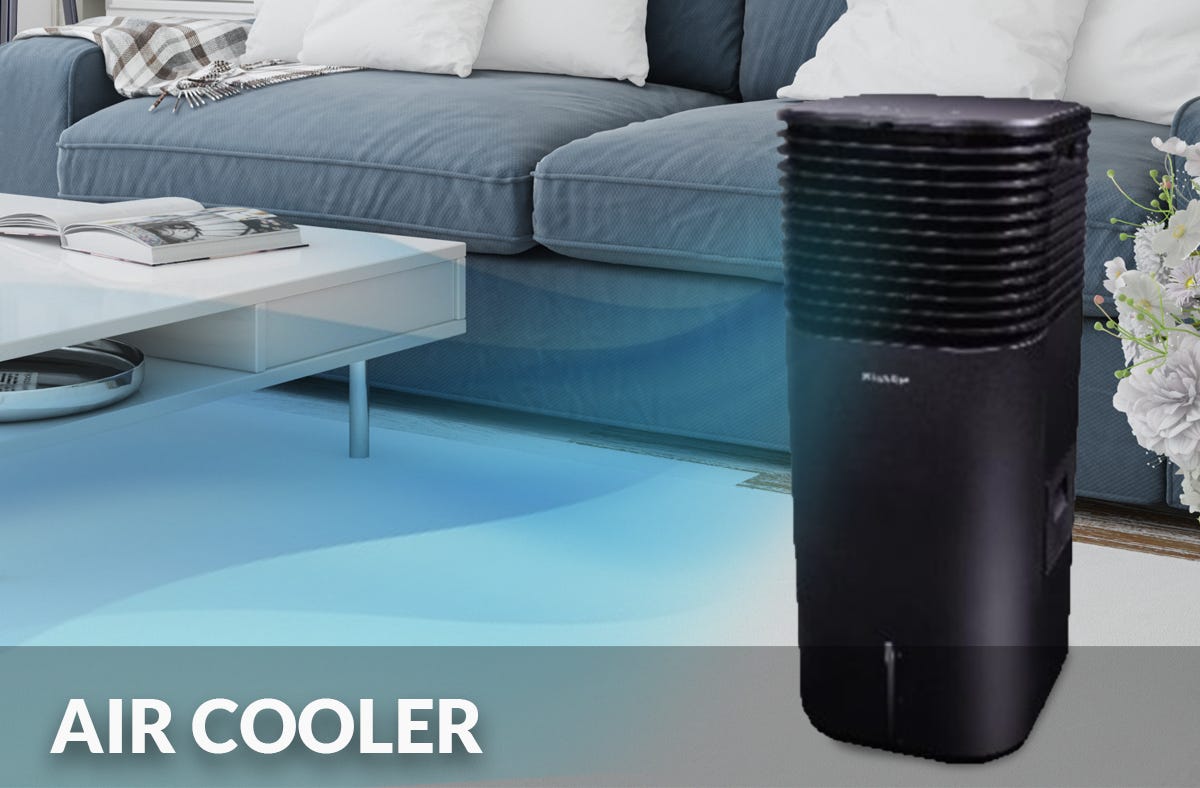
Cools the air around an area

The Importance of a Fridge
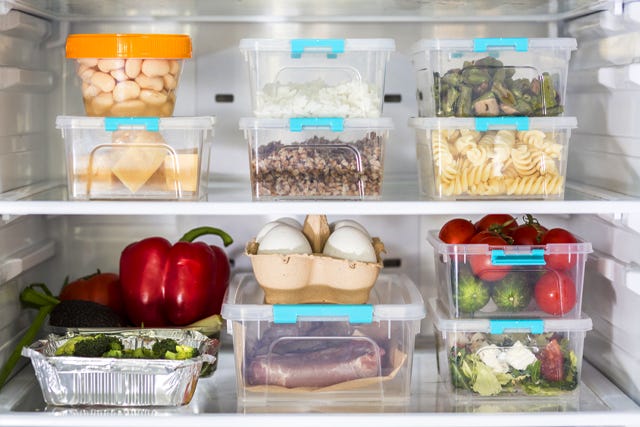
A refrigerator is a necessary and important equipment in the kitchen. With the presence of a refrigerator, food kept in it can last longer - as the cold air would slow down the growth of bacteria. Bacteria are most active, allowing it to grow rapidly at the temperature of 40° F to 140° F (or, 4° C to 60° C), therefore temperature of refrigerators should be kept at 40° F (or, 4° C) or below. As an added note, it takes approximately 24 hours for the refrigerator to adjust to any changes that is made. Moreover, this can prevent the growth of some bacteria which can cause illnesses.
A refrigerator is a necessary and important equipment in the kitchen. With the presence of a refrigerator, food kept in it can last longer - as the cold air would slow down the growth of bacteria. Bacteria are most active, allowing it to grow rapidly at the temperature of 40° F to 140° F (or, 4° C to 60° C), therefore temperature of refrigerators should be kept at 40° F (or, 4° C) or below. As an added note, it takes approximately 24 hours for the refrigerator to adjust to any changes that is made. Moreover, this can prevent the growth of some bacteria which can cause illnesses.
Reversible Door Swing Fridge
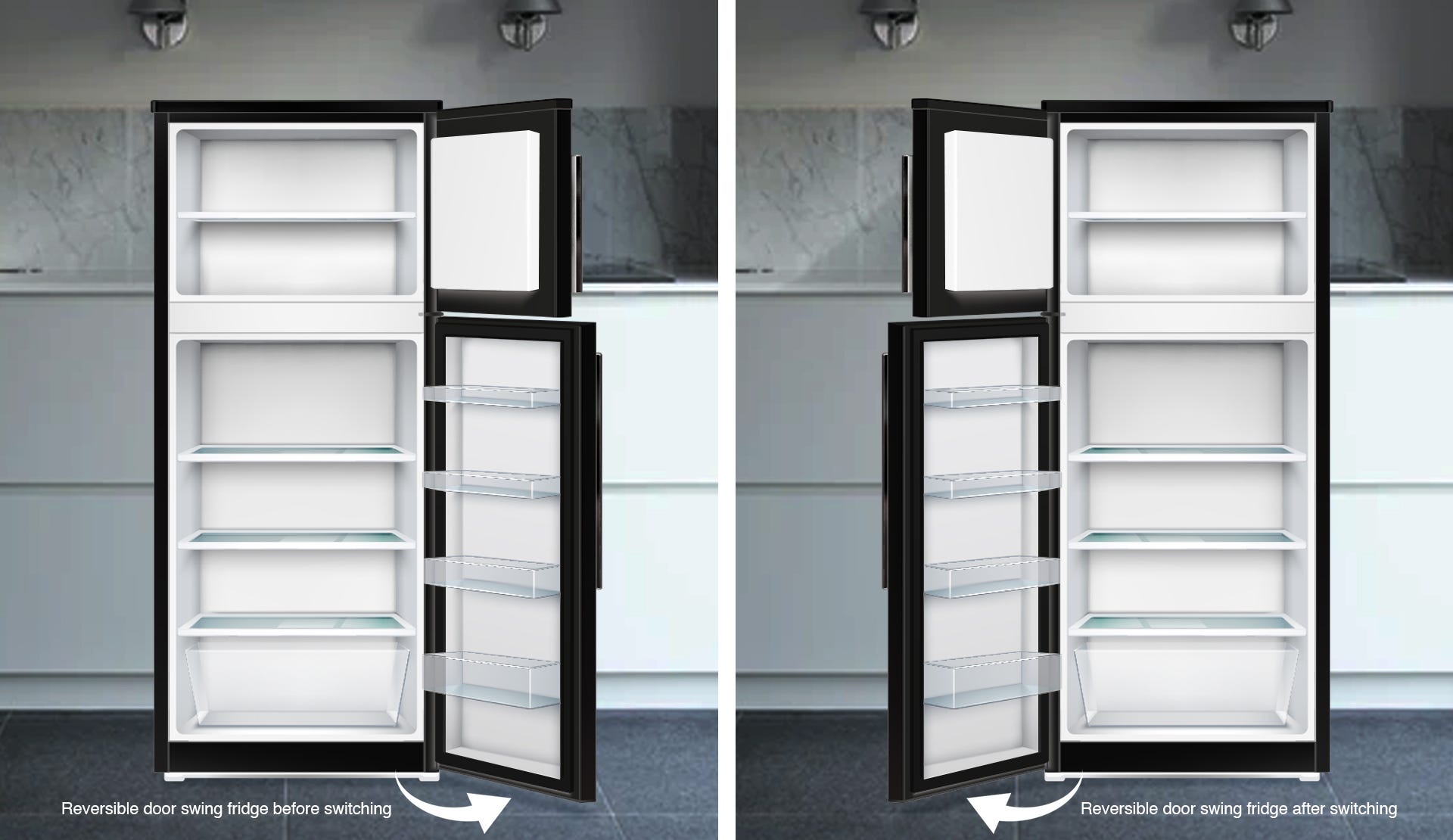
This option allows one to change the opening and closing door for the fridge. Providing ease to all to minimise issues with fitting the appliance in constrainted areas.
This option allows one to change the opening and closing door for the fridge. Providing ease to all to minimise issues with fitting the appliance in constrainted areas.
How to Save Money & Energy?
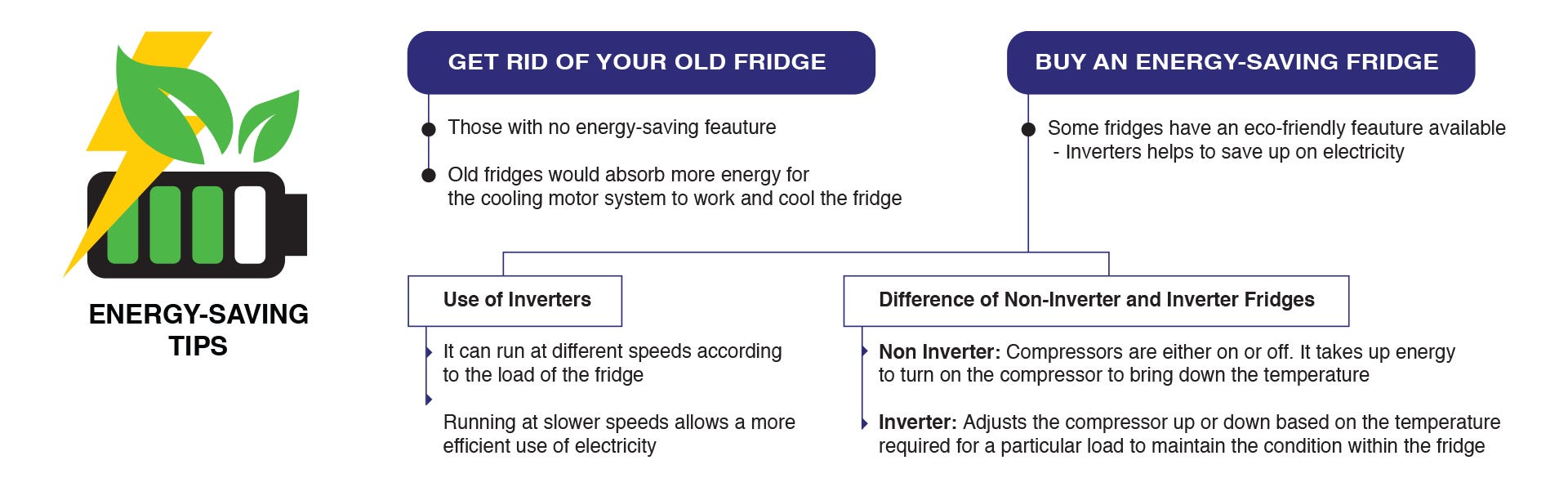
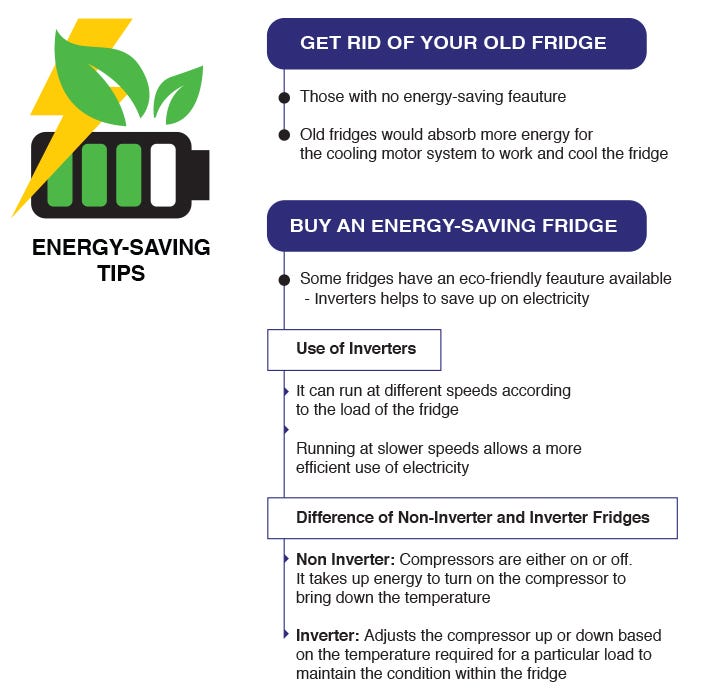
Being eco-friendly is one way to save the Earth!
Being eco-friendly is one way to save the Earth!
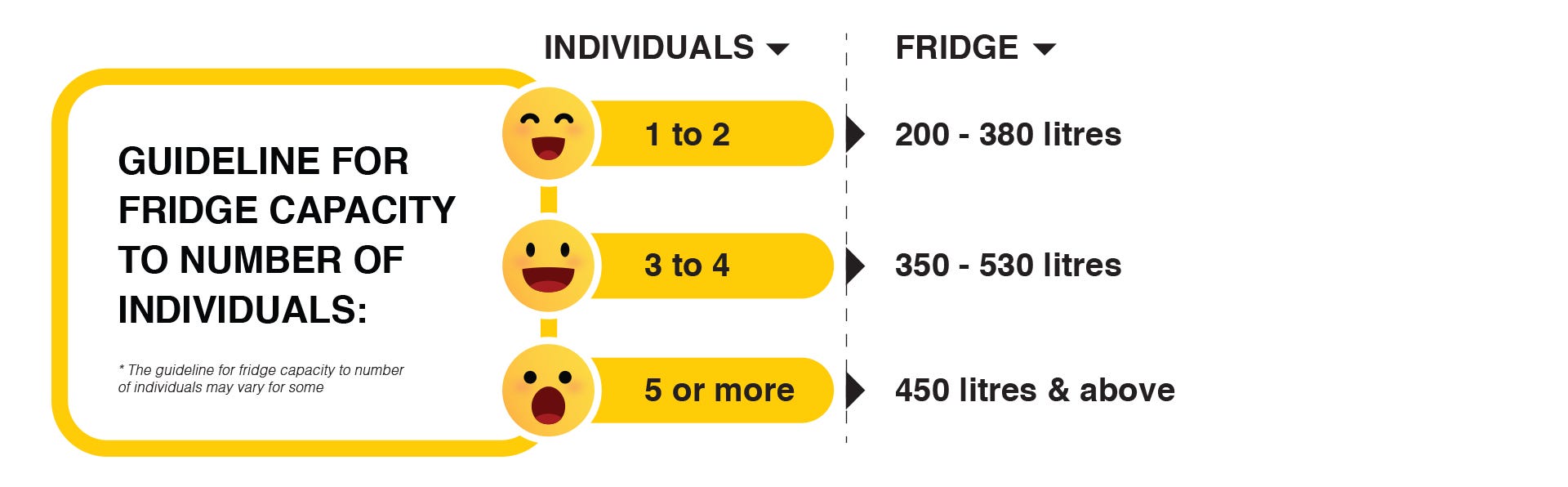
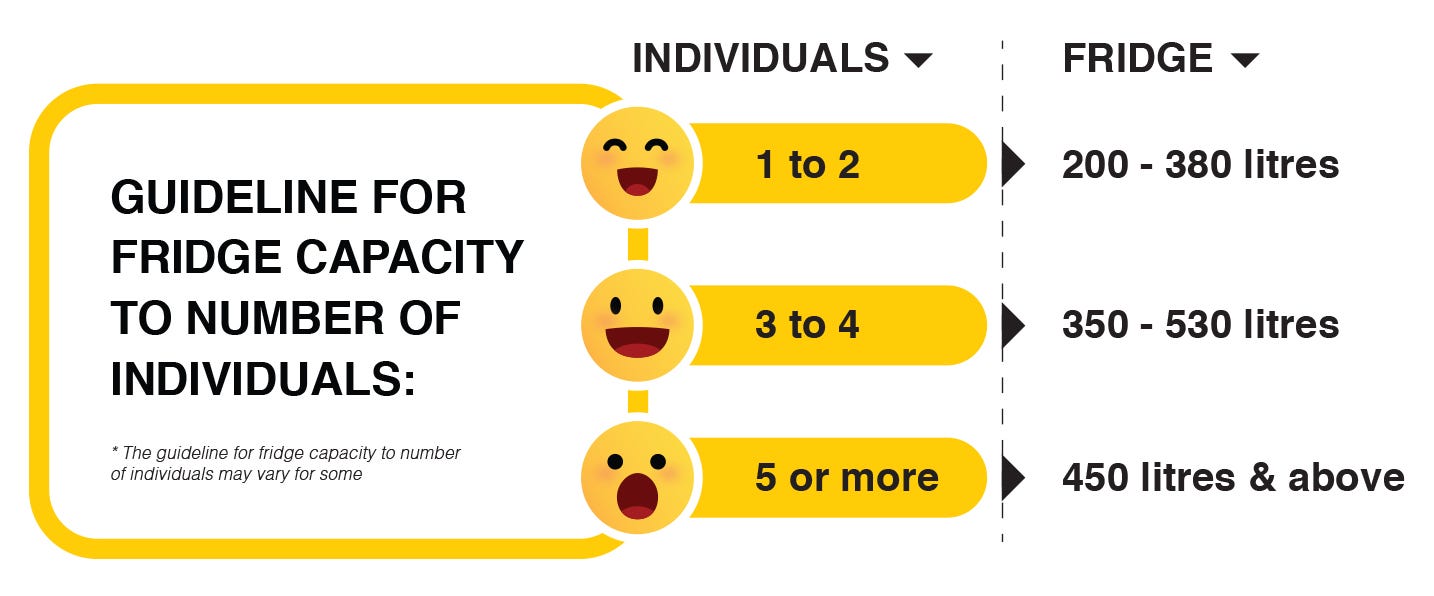
Which Fridge Capacity (Litres) to Purchase?
The capacity of the fridge, in litres could be purchased based on the number of individuals in a household
The capacity of the fridge, in litres could be purchased based on the number of individuals in a household
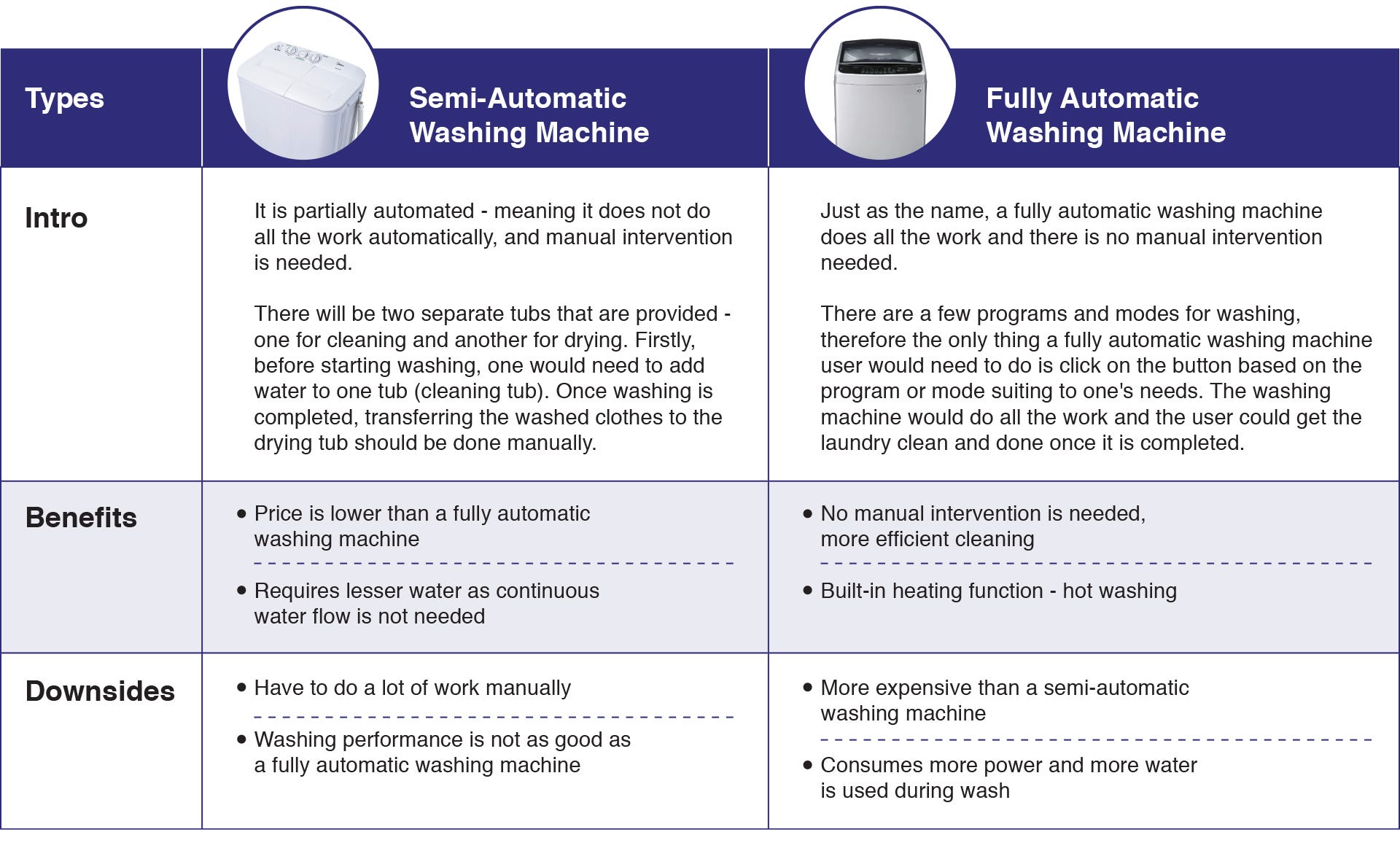
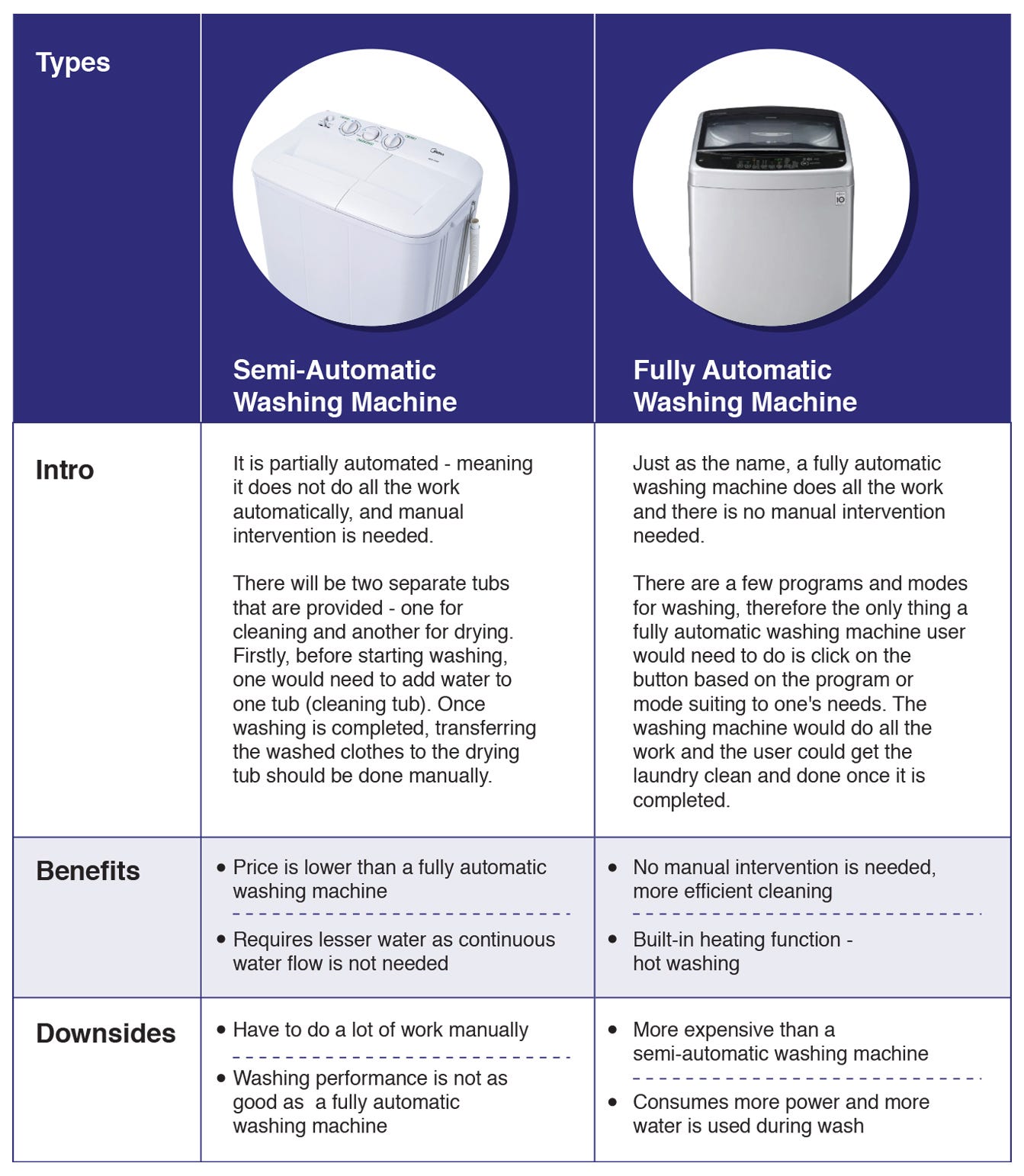
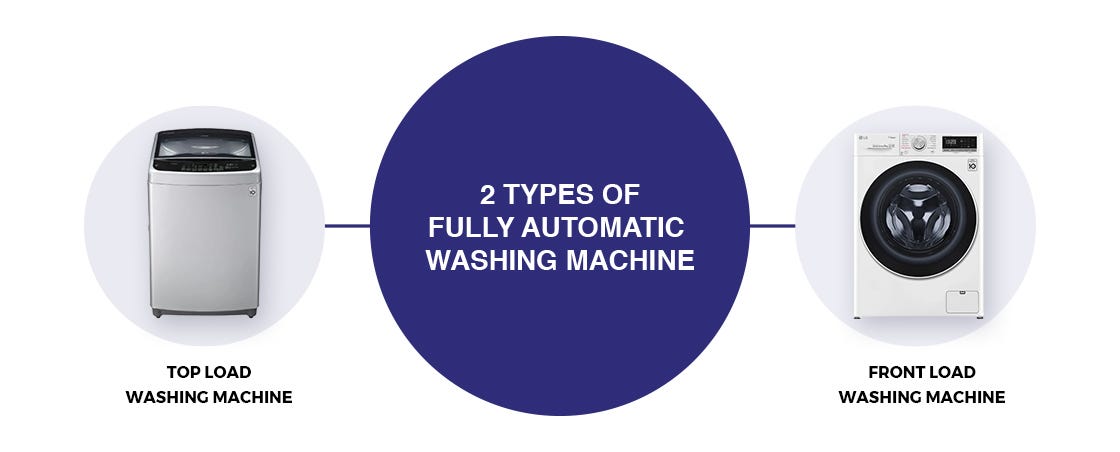
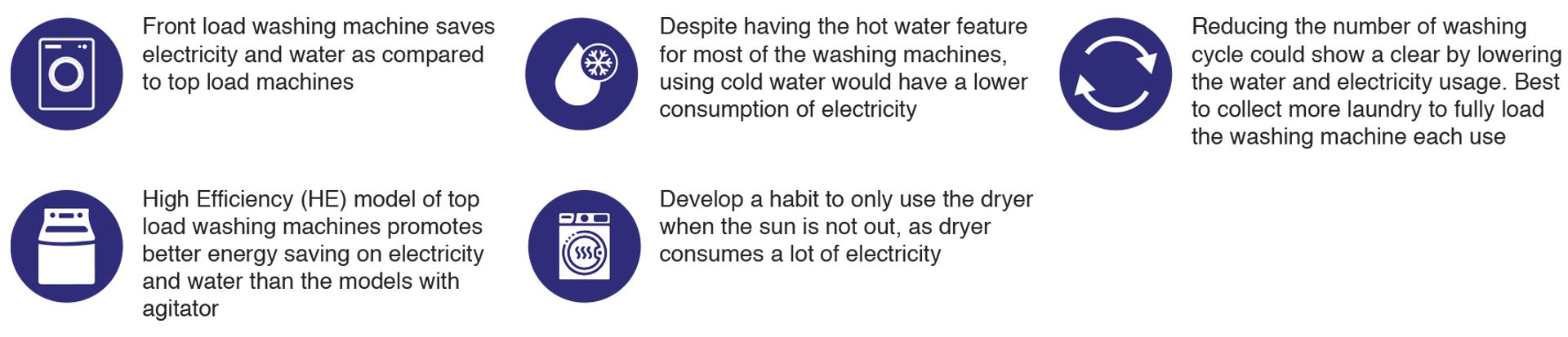
There are two types of fully automatic washing machine as seen above. Following
its name, top load washing machines have the door on top, therefore it is loaded
from the top, whereas front load washing machines have the door at the front of
the washing machine where it is loaded.
Difference between Top Load Washing Machine and Front Load Washing
Machine
Ease of Using
Top load washing machines are easier in the sense as compared to front load washing machines that the user does not need to bend to load and unload clothes. Top load machines also allow users to add-in clothes during the washing cycle, by simply clicking the pause button.
Conclusion:A top load washing machine gives an advantage users, especially older buyers
Top load washing machines allow the function of adding clothes during the
washing cycle
Spin Speed
This would make a difference in terms of quicker drying process, resulting in energy-efficiency. The higher the spin speed (RPMs), the faster the drying. Most front load washing machines have spin speeds in 1000 to 1600 RPMs, whereas some top load washing machines could have 1000 RPMs or lower.
Conclusion:Front load washing machines have a faster spin speed, therefore drying the
clothes quicker
Washing Operation - Cleans Better and Quicker Wash
A front load washing machine is quieter and more gentle on clothes, as compared to a top load washing machine which produces more sound and are rougher on clothes.
There are two main types of top load washing machines, one that has an agitator, and one without (known as the high-efficiency model). An agitator creates a sense of motion by shaking and forcing water around the machine, which leads to vibrations. Even though the ones with an agitator washes quicker, it does not clean as good as a high-efficiency model.
Conclusion:Front load washing is more quiet, gentle and cleans better
Top load washing machines with agitators wash quicker but a high-efficiency
model washes cleaner for this particular type
Mold or Mildew Issues
The biggest complaint for a front load washing machine is the growth of mold along the door's rubber gasket. The reason for this is due to the excessive use of detergent or softer, or the stay wet between uses of the drum and gasket. This is hardly an issue for the top load washing machines as the moisture could easily evaporate from unsealed top door.
Conclusion:Top load washing machines does not face mold or mildew issues
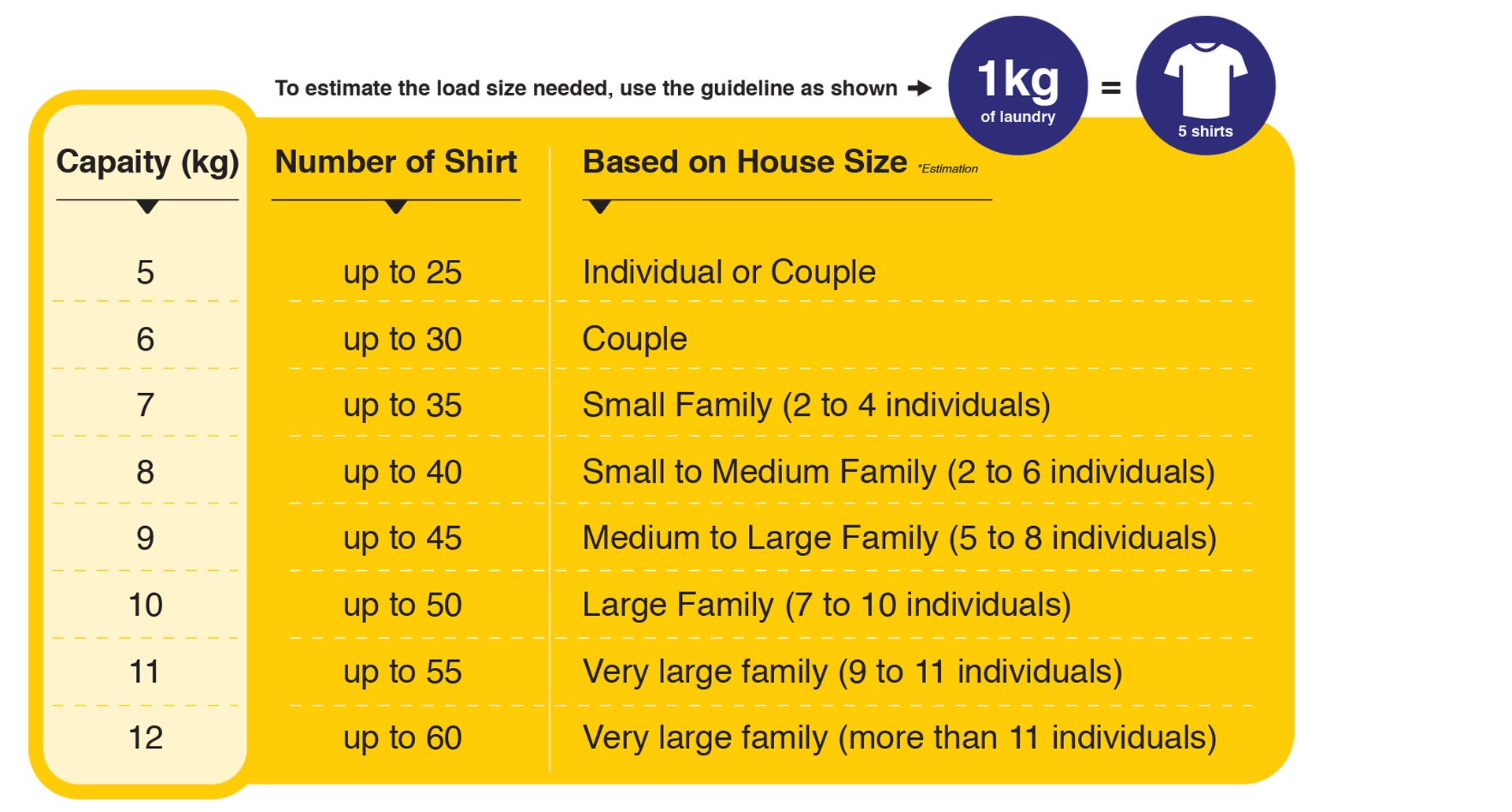
What Size Washing Machine to Get?
To estimate the load size needed, use the guideline as shown:
Ease of Using
Top load washing machines are easier in the sense as compared to front load washing machines that the user does not need to bend to load and unload clothes. Top load machines also allow users to add-in clothes during the washing cycle, by simply clicking the pause button.
Conclusion:
Spin Speed
This would make a difference in terms of quicker drying process, resulting in energy-efficiency. The higher the spin speed (RPMs), the faster the drying. Most front load washing machines have spin speeds in 1000 to 1600 RPMs, whereas some top load washing machines could have 1000 RPMs or lower.
Conclusion:
Washing Operation - Cleans Better and Quicker Wash
A front load washing machine is quieter and more gentle on clothes, as compared to a top load washing machine which produces more sound and are rougher on clothes.
There are two main types of top load washing machines, one that has an agitator, and one without (known as the high-efficiency model). An agitator creates a sense of motion by shaking and forcing water around the machine, which leads to vibrations. Even though the ones with an agitator washes quicker, it does not clean as good as a high-efficiency model.
Conclusion:
Mold or Mildew Issues
The biggest complaint for a front load washing machine is the growth of mold along the door's rubber gasket. The reason for this is due to the excessive use of detergent or softer, or the stay wet between uses of the drum and gasket. This is hardly an issue for the top load washing machines as the moisture could easily evaporate from unsealed top door.
Conclusion:
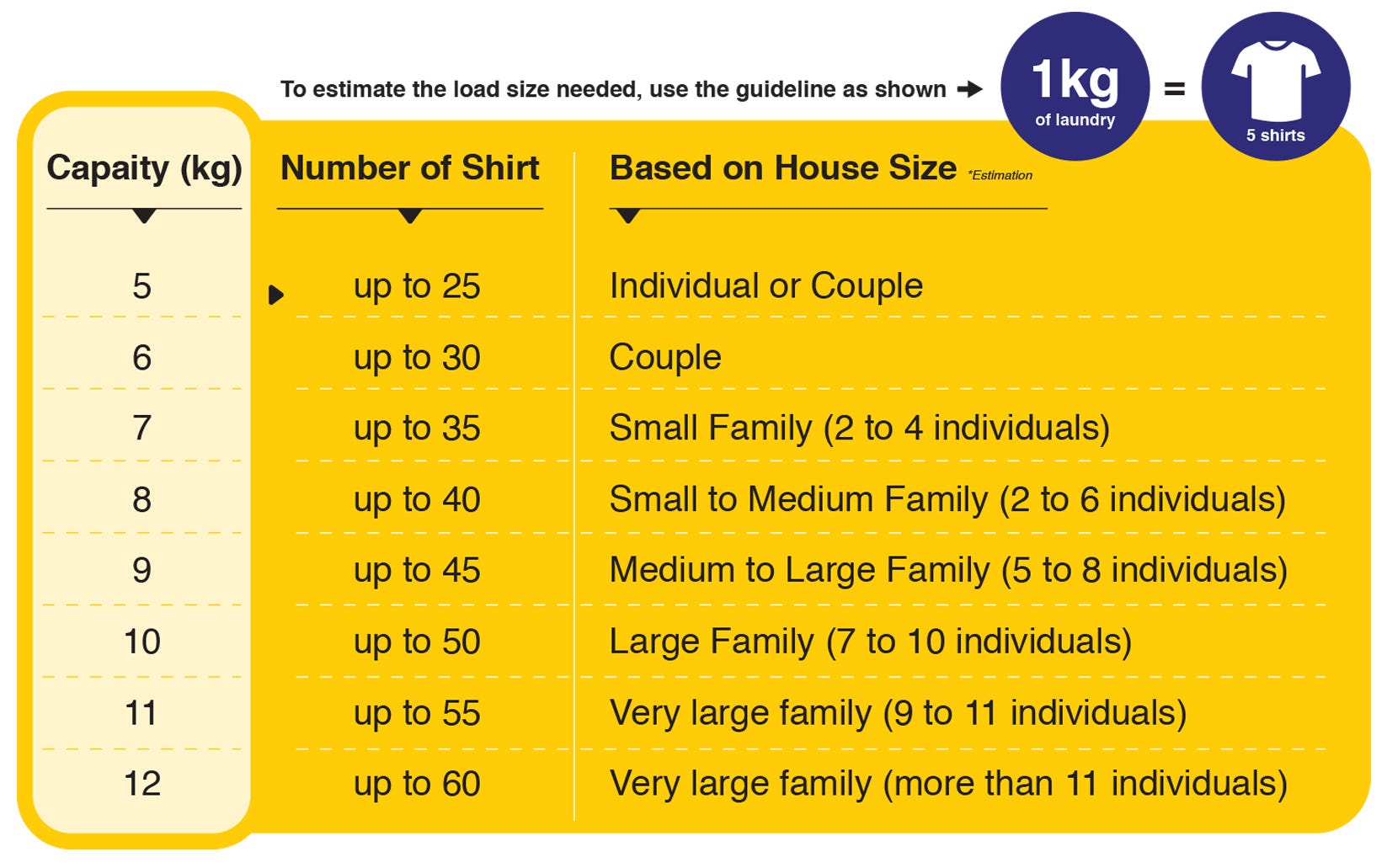
What Size Washing Machine to Get?
To estimate the load size needed, use the guideline as shown:
Energy-Efficiency
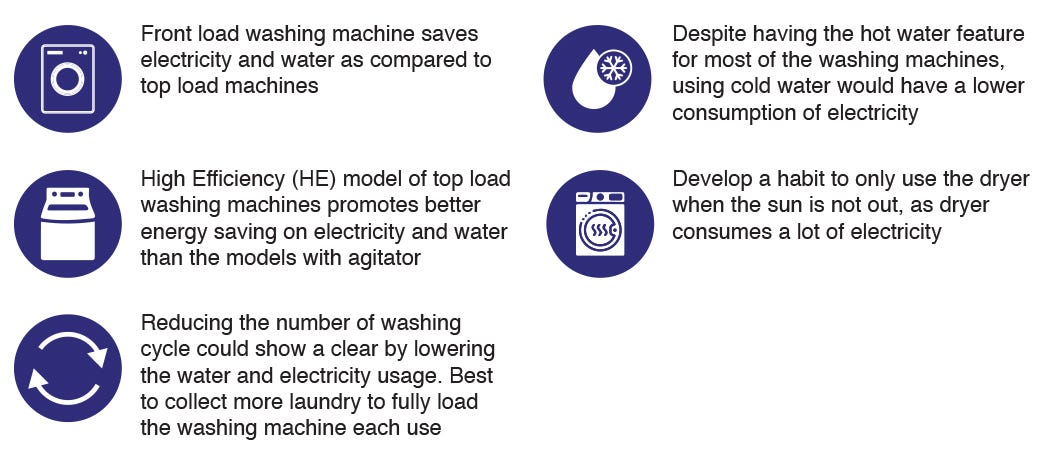
Choosing the right washing machine to save energy could be challenging with the various types of it available.
Choosing the right washing machine to save energy could be challenging with the various types of it available.
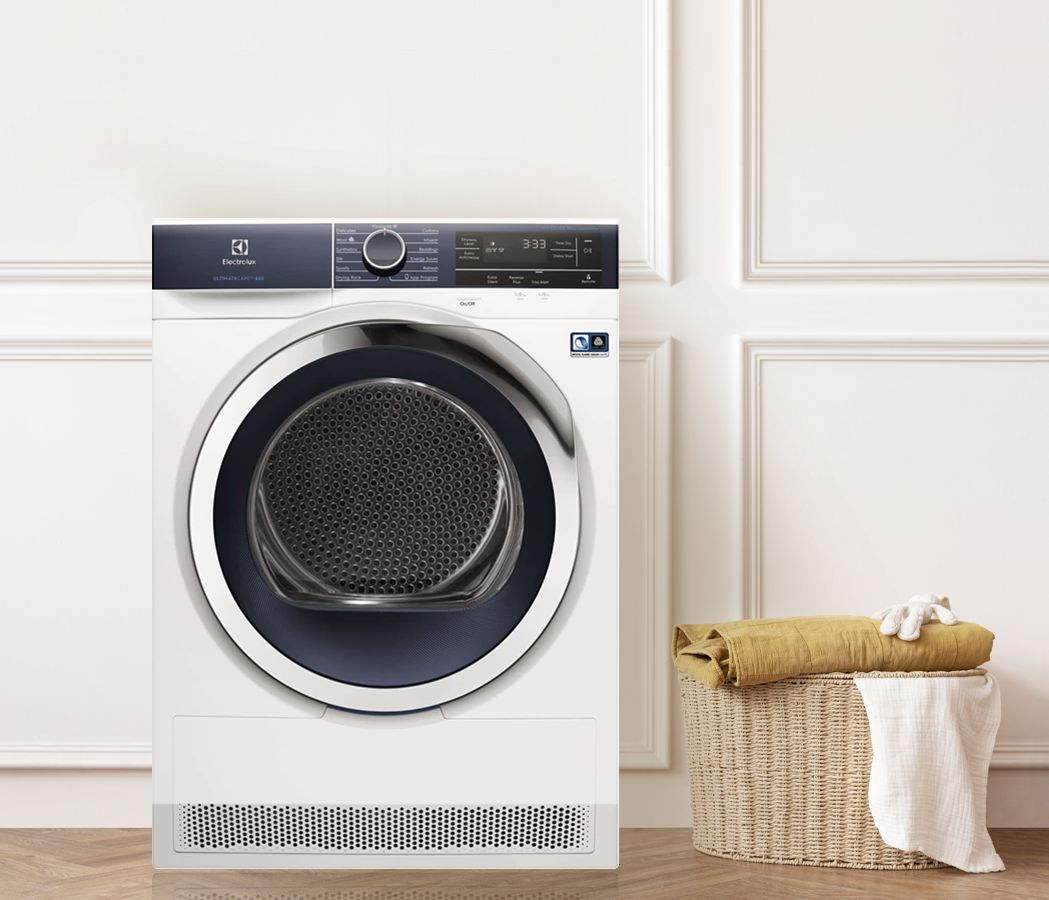
DRYER BUYING GUIDE
Purchasing a dryer may not be as easy as it seems with the couple of choices
available. In addition, there are a couple of things to look for when getting a
dryer - these may be important to get the best choice based on your preference
and suitability
The Importance of a Dryer
Dryer comes in handy when you would need to dry your clothes. This comes to great use for individuals who tend to be out a lot, therefore it is not very easy to leave the clothes out for drying with the possibility of raining. It also is very useful during the raining season or if your area just rains often. Without a dryer, it may take longer for your clothes to dry, which ends up causing a lot of hassle. To avoid all problems, comes the need for a dryer
The Importance of a Dryer
Dryer comes in handy when you would need to dry your clothes. This comes to great use for individuals who tend to be out a lot, therefore it is not very easy to leave the clothes out for drying with the possibility of raining. It also is very useful during the raining season or if your area just rains often. Without a dryer, it may take longer for your clothes to dry, which ends up causing a lot of hassle. To avoid all problems, comes the need for a dryer
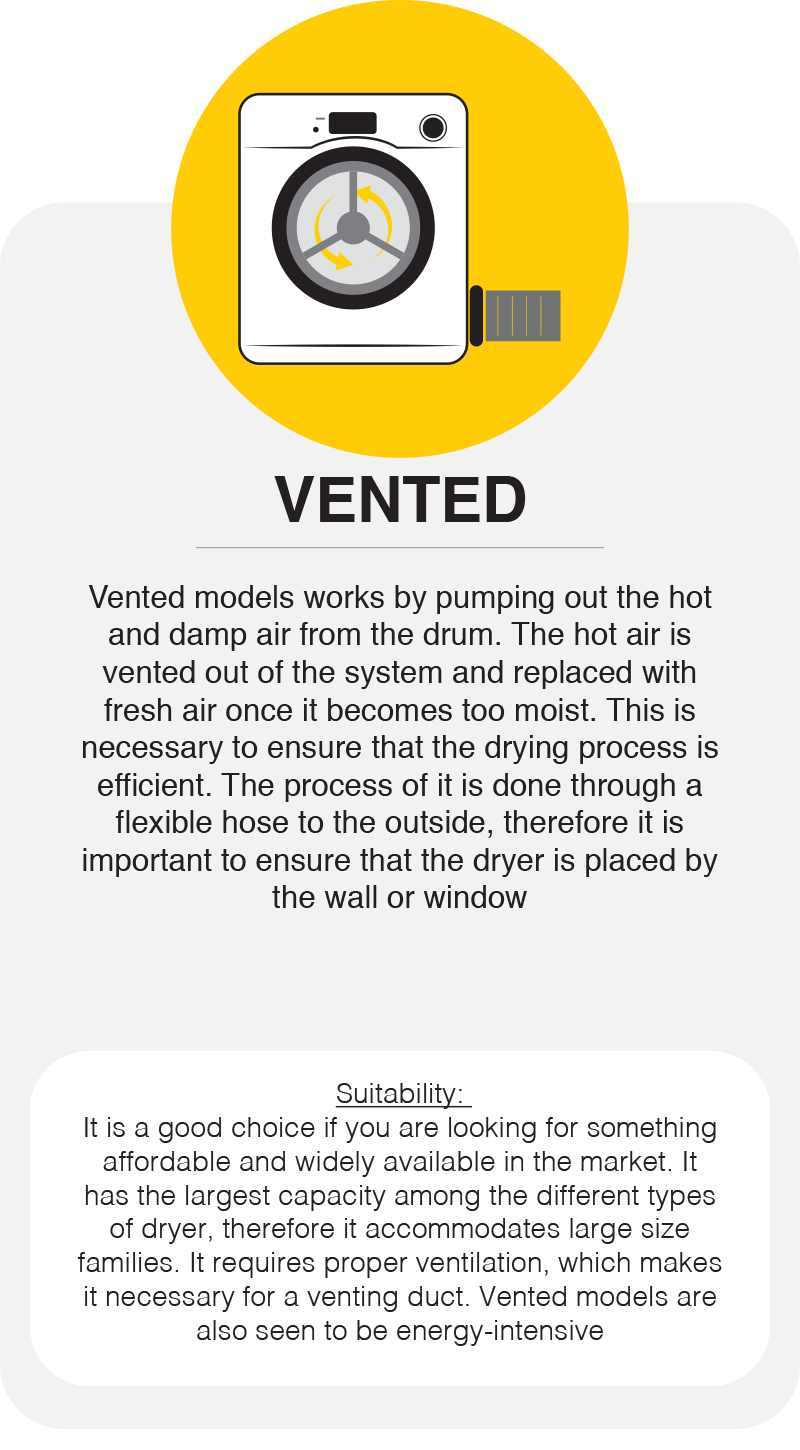
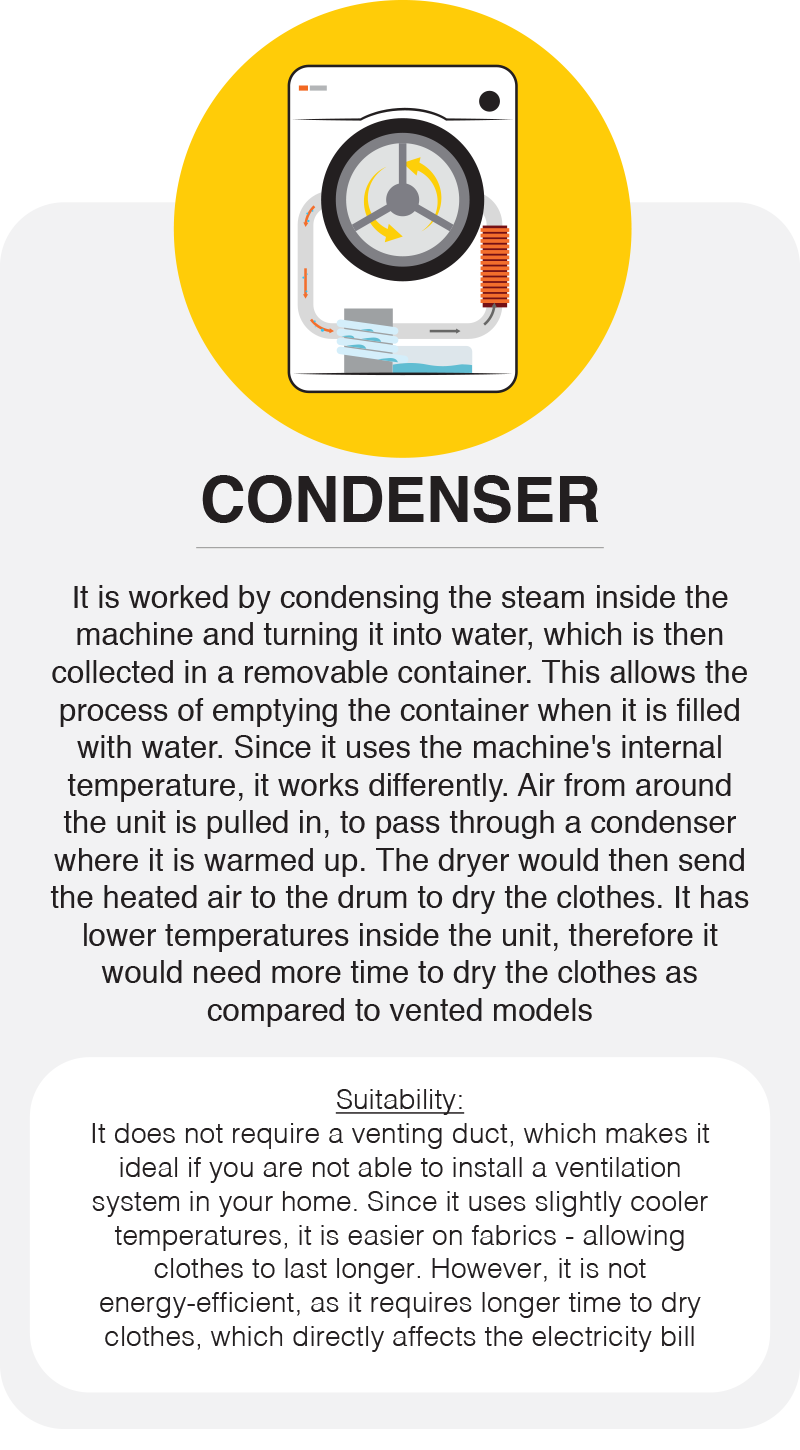
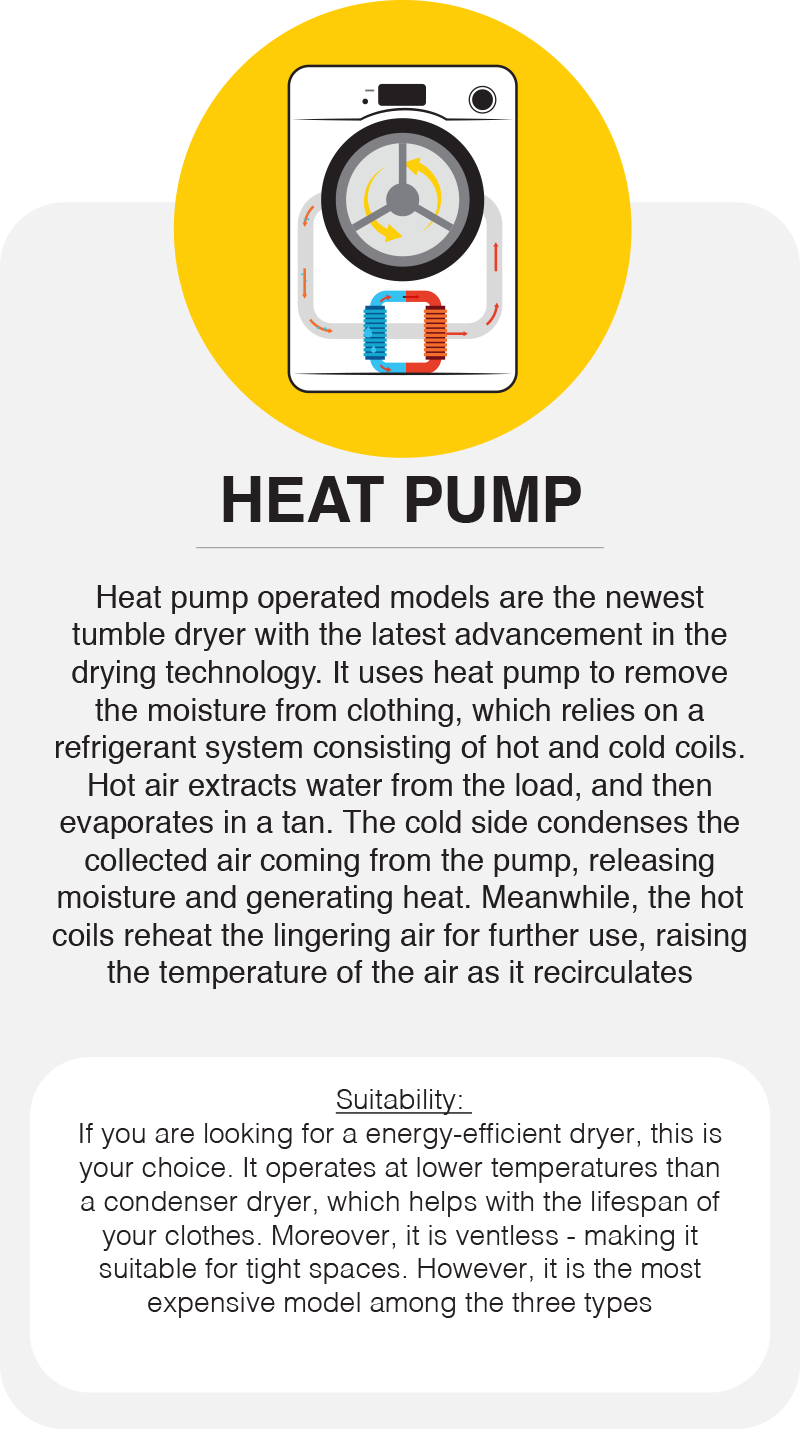
There are three types of dryers; Vented, Condenser, Heat
Pump
What to Look For?
There are some function which may be important to users, based on the specifications that is looked for. Therefore, it is wise to check on what is suitable for your home
1. Sensor Technology (vs Manual)
The sensors would monitor the humidity in the drum throughout the cycle, and stops the dryer once the laundry is dry. This helps save time and money - as tumble dryers have always been seen as an appliance that uses a lot of energy. Even though tumble dryers with sensors are more expensive, it could help save cost in the long-run. Manual tumble dryers are cheaper, but you will need to program the machine yourself, which may result in you drying the load for longer than necessary. This would not just cost extra to your electricity bill, but also damage your clothes
2. Programming
The programs or settings are different for sensor and manual models - manual models have at least two or three settings; cottons, synthetics, and delicates, whereas sensor has more programs
Most tumble dryers have three degrees of dryness for cotton and synthetic settings, such as:
| Iron Dry | This leaves the laundry slightly damp, which makes ironing easier. However, you would need to do the ironing as soon as you take the laundry out of the dryer to maximise the efficiency |
|---|---|
| Cupboard Dry | This ensures that the laundry is dry enough to be put away once the cycle has finished |
| Extra Dry | This setting leaves the laundry totally dry. It is suitable for large and thick items |
3. Drum Size
It is best to have a large-capacity tumble dryer for drying purpose, and also energy-efficient, as it would take lesser time to dry. Below shows an estimation of drum size (in kilogram, kg) ideal for a certain number of t-shirts:
7 kg: Fits 35 t-shirts (Ideal for small families)
8 kg: Fits 40 t-shirts (Ideal for medium families)
9 kg: Fits 45 t-shirts (Ideal for large families)
10 kg: Fits 50 t-shirts (Ideal for large families)
4. Child Lock
If you have a child at home, it is best to have a dryer with a child lock function. This is useful to stop children from playing with the controls, which may cause disturbance to the drying cycle, or cause fault in the machine.
5. Time Remaining Display
Some sensor models would have a display function which shows the estimation time on how long the laundry would take to dry. This is a function that may not be available on all sensor models, therefore have it on a look-out if it is something that interests you
It is best to have a large-capacity tumble dryer for drying purpose, and also energy-efficient, as it would take lesser time to dry. Below shows an estimation of drum size (in kilogram, kg) ideal for a certain number of t-shirts:
4. Child Lock
If you have a child at home, it is best to have a dryer with a child lock function. This is useful to stop children from playing with the controls, which may cause disturbance to the drying cycle, or cause fault in the machine.
5. Time Remaining Display
Some sensor models would have a display function which shows the estimation time on how long the laundry would take to dry. This is a function that may not be available on all sensor models, therefore have it on a look-out if it is something that interests you




THE IMPORTANCE OF A LAPTOP
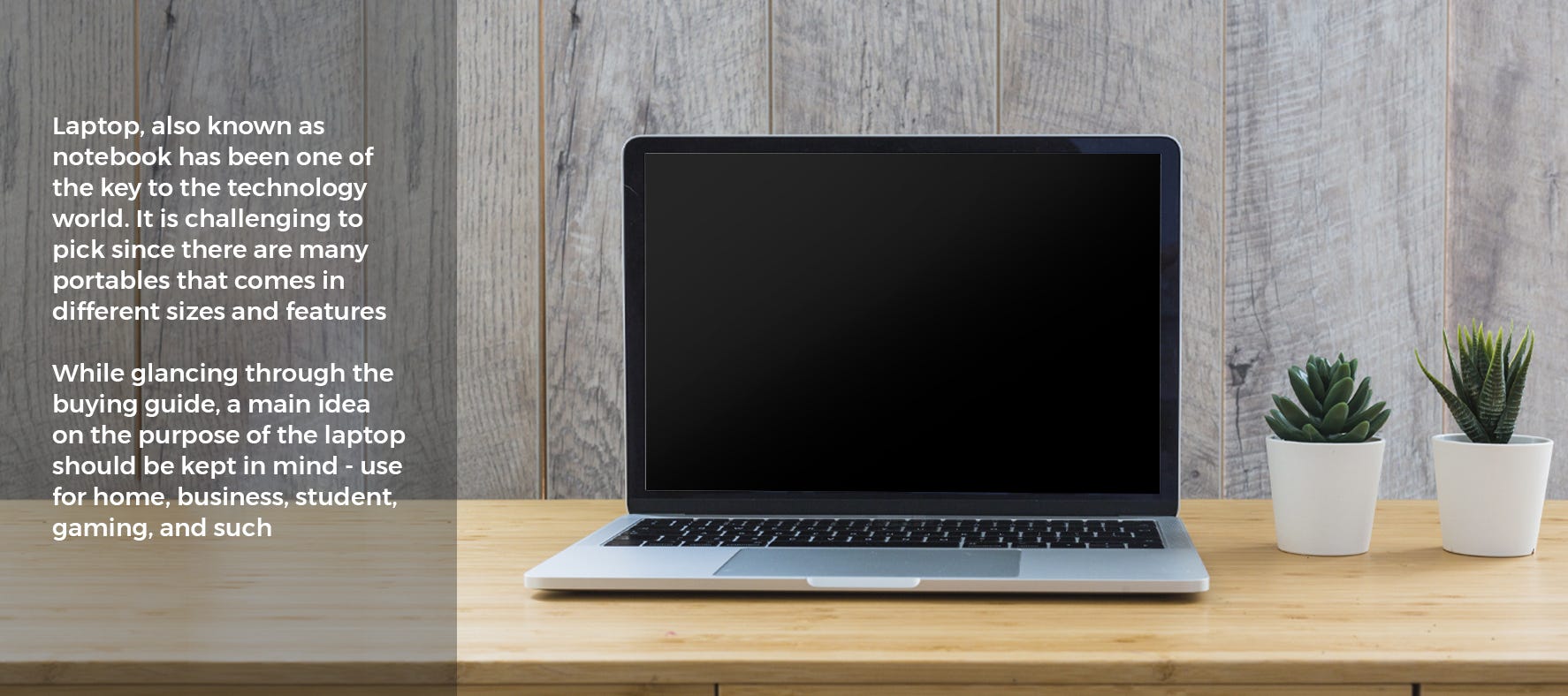
In today's world, technology is advancing quickly. It does not matter how technology-savvy an individual is, laptop has become a necessity to ease many activities, including office work, studies, gaming, entertainment, personal use (like communication, shopping, travel), as well as storing data and information. Laptops have similar function as to desktops, with only a couple of added functions. However, it is clearly seen that laptops are gaining more recognition and importance as compared to desktops - being a portable computer at one's fingertips.
PROCESSOR OR CPU (CENTRAL PROCESSING UNIT)
It acts as the brain of the computer and does most of the work. It is the most important hardware, when it comes to what the computer is capable of. The CPU would execute the action when an access or changing of data is required.
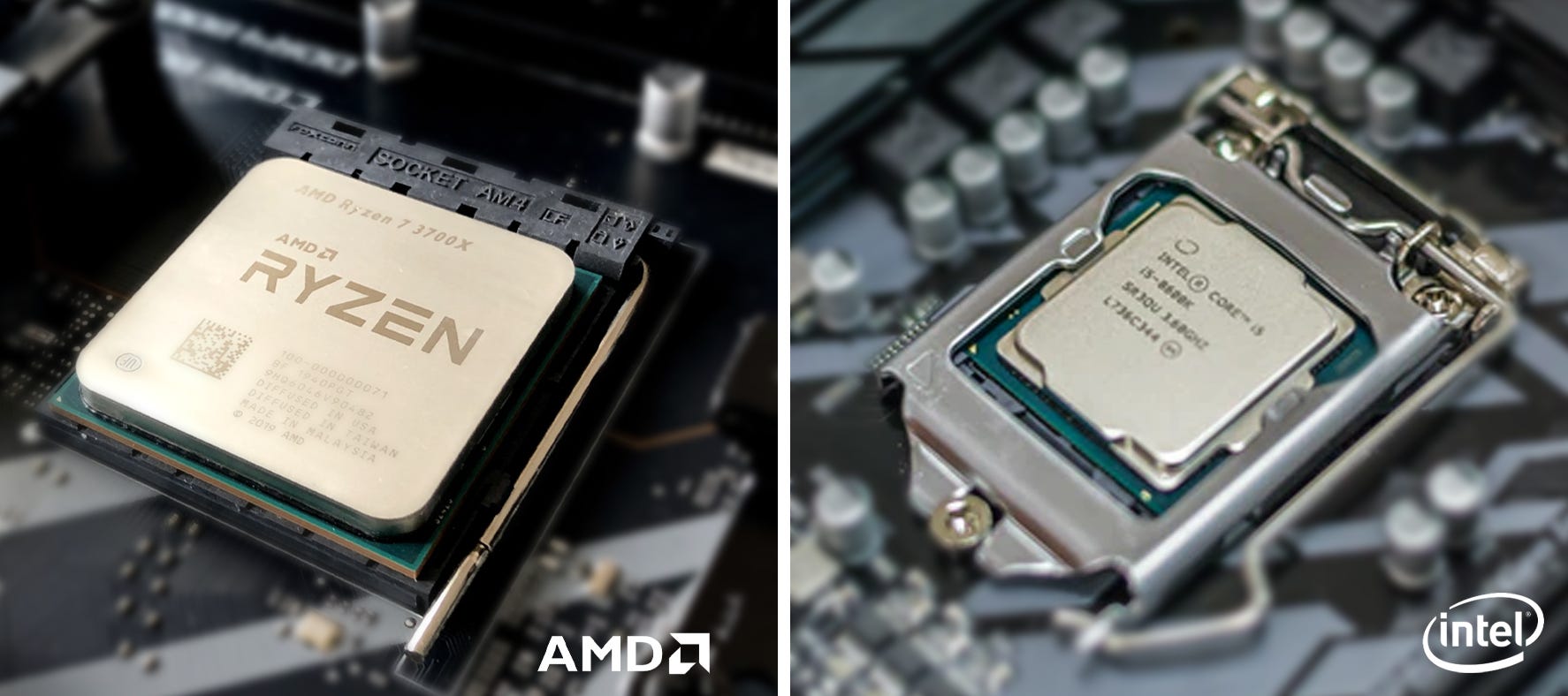
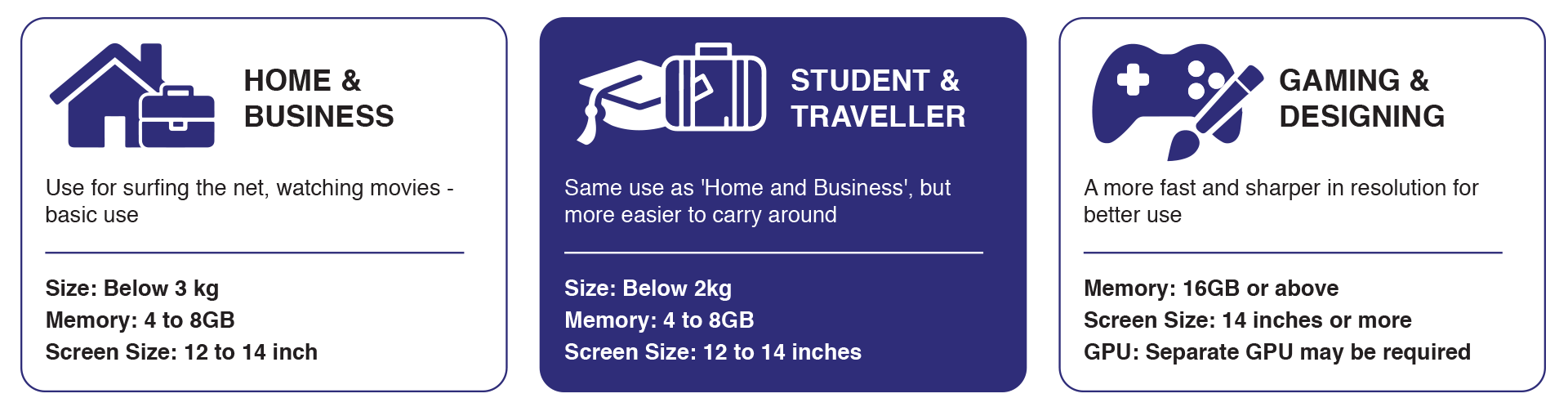
The two main and best processors are Intel and AMD. However, there is no one best processor as it all depends on the use of the laptop. If an individual just wants to browse the web and watch Netflix, there is no point of purchasing a high-end chip for a laptop. Nevertheless, processors should not be the only detail to look at, as there as many other factors contributing on whether a laptop is suitable for different groups of individuals.
In today's world, technology is advancing quickly. It does not matter how technology-savvy an individual is, laptop has become a necessity to ease many activities, including office work, studies, gaming, entertainment, personal use (like communication, shopping, travel), as well as storing data and information. Laptops have similar function as to desktops, with only a couple of added functions. However, it is clearly seen that laptops are gaining more recognition and importance as compared to desktops - being a portable computer at one's fingertips.
WHAT YOU NEED TO KNOW ABOUT HARDWARE – INSIDE A LAPTOP
PROCESSOR OR CPU (CENTRAL PROCESSING UNIT)
It acts as the brain of the computer and does most of the work. It is the most important hardware, when it comes to what the computer is capable of. The CPU would execute the action when an access or changing of data is required.
The two main and best processors are Intel and AMD. However, there is no one best processor as it all depends on the use of the laptop. If an individual just wants to browse the web and watch Netflix, there is no point of purchasing a high-end chip for a laptop. Nevertheless, processors should not be the only detail to look at, as there as many other factors contributing on whether a laptop is suitable for different groups of individuals.
In short, the heavier the load of the laptop, such as graphic cards, the faster the
processor
that is required.
GRAPHICS OR GPU (GRAPHIC PROCESSING UNIT)
It is a separate CPU dedicated to one task - generates all images you see on the screen. The better the GPU, the quicker the images appear, with lots of detail, and fast refresh rates.
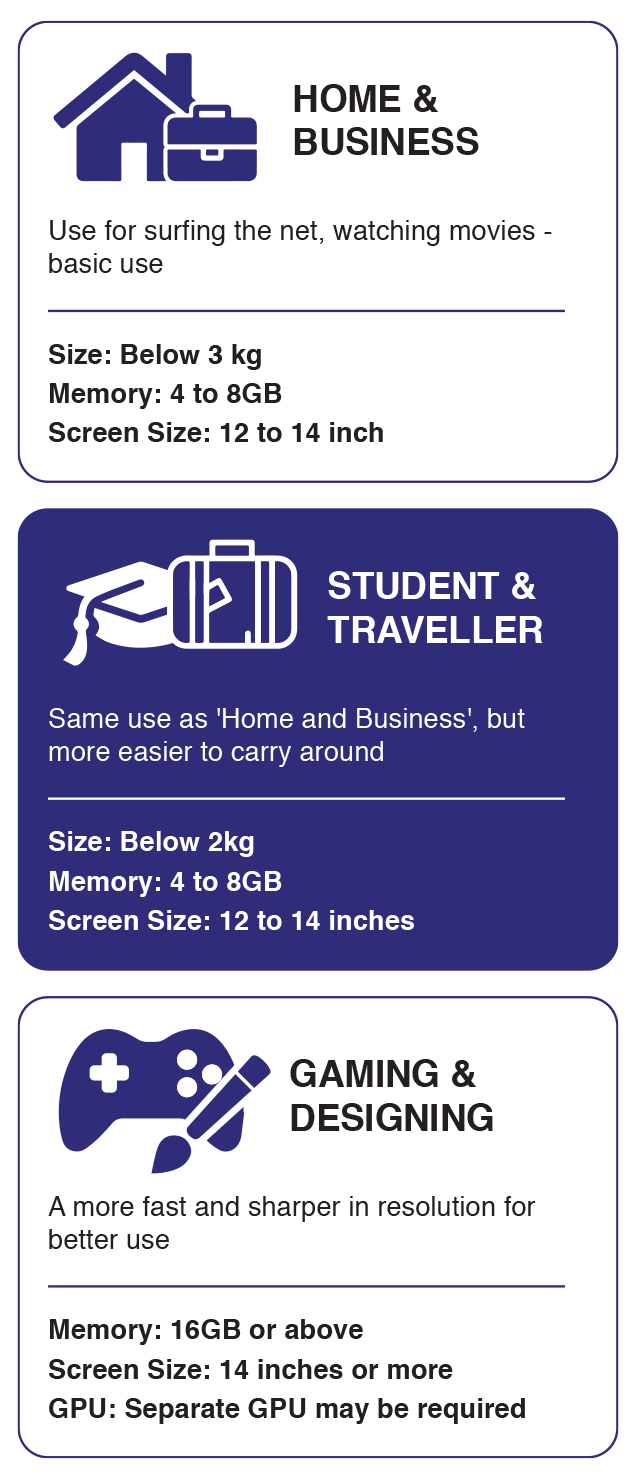
As good as the GPU could be, it should work alongside with the laptop's CPU and RAM to deliver the best results. This is necessary for gamers or graphic designers for instance, who does video or image editing. A basic use of the laptop would not need a separate GPU from the one that is already built into the processor.
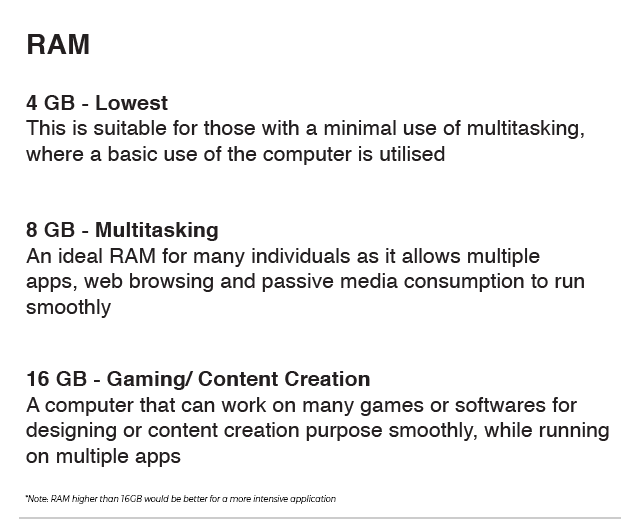
RAM (RANDOM ACCESS MEMORY)
This is where the CPU stores its files that it is working on, such as the operating system and any apps that is opened. It is a dedicated hardware for temporarily storing information for immediate use based on how much space the RAM could offer the laptop.
The more RAM that the laptop has, the more information or apps the laptop can run simultaneously - leading to a faster system performance. Despite having all hardwares integrating with one another to offer the best result, many individuals tend to have a bigger investment for the computer's RAM, which gives a greater difference in terms of performance than buying a faster processor. However, one should note to not dismiss the importance of a processor as well.
GRAPHICS OR GPU (GRAPHIC PROCESSING UNIT)
It is a separate CPU dedicated to one task - generates all images you see on the screen. The better the GPU, the quicker the images appear, with lots of detail, and fast refresh rates.
As good as the GPU could be, it should work alongside with the laptop's CPU and RAM to deliver the best results. This is necessary for gamers or graphic designers for instance, who does video or image editing. A basic use of the laptop would not need a separate GPU from the one that is already built into the processor.
RAM (RANDOM ACCESS MEMORY)
This is where the CPU stores its files that it is working on, such as the operating system and any apps that is opened. It is a dedicated hardware for temporarily storing information for immediate use based on how much space the RAM could offer the laptop.
The more RAM that the laptop has, the more information or apps the laptop can run simultaneously - leading to a faster system performance. Despite having all hardwares integrating with one another to offer the best result, many individuals tend to have a bigger investment for the computer's RAM, which gives a greater difference in terms of performance than buying a faster processor. However, one should note to not dismiss the importance of a processor as well.

STORAGE
The amount of internal storage on a laptop shows how much space it has to store data and information in total, inclusive of installed programs to downloaded movies or music. Being different from RAM, an unused app would not take space on the memory, but it does on the storage space.
Laptops would either use a solid-state drive (SSD) or hard disk drive (HDD), or both - being hybrid. Hybrid brings out the best of both sides. SSDs are much faster at reading and storing data as compared to HDD. However, SSDs cost much more per GB of storage than HDD, therefore it has its own advantages. Many laptops nowadays rely on SSDs.
It is important to choose a proper storage size before purchasing a laptop, as it would cost extra to get an external source as a storage. It is also possible to get a laptop with enough local storage and opt for the subscription for a cloud storage, other than a SSD or HDD.
WHAT YOU NEED TO KNOW ABOUT THE DESIGN – OUTSIDE A LAPTOP
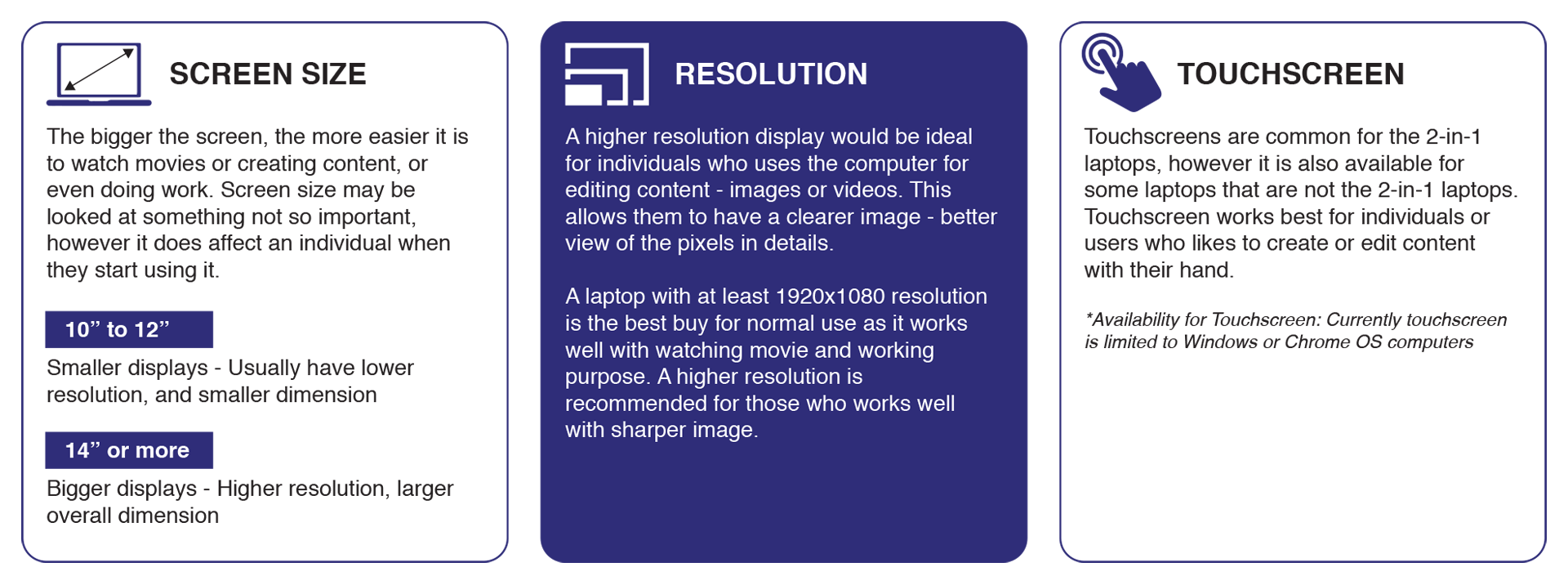
DISPLAY
The amount of internal storage on a laptop shows how much space it has to store data and information in total, inclusive of installed programs to downloaded movies or music. Being different from RAM, an unused app would not take space on the memory, but it does on the storage space.
Laptops would either use a solid-state drive (SSD) or hard disk drive (HDD), or both - being hybrid. Hybrid brings out the best of both sides. SSDs are much faster at reading and storing data as compared to HDD. However, SSDs cost much more per GB of storage than HDD, therefore it has its own advantages. Many laptops nowadays rely on SSDs.
It is important to choose a proper storage size before purchasing a laptop, as it would cost extra to get an external source as a storage. It is also possible to get a laptop with enough local storage and opt for the subscription for a cloud storage, other than a SSD or HDD.
WHAT YOU NEED TO KNOW ABOUT THE DESIGN – OUTSIDE A LAPTOP
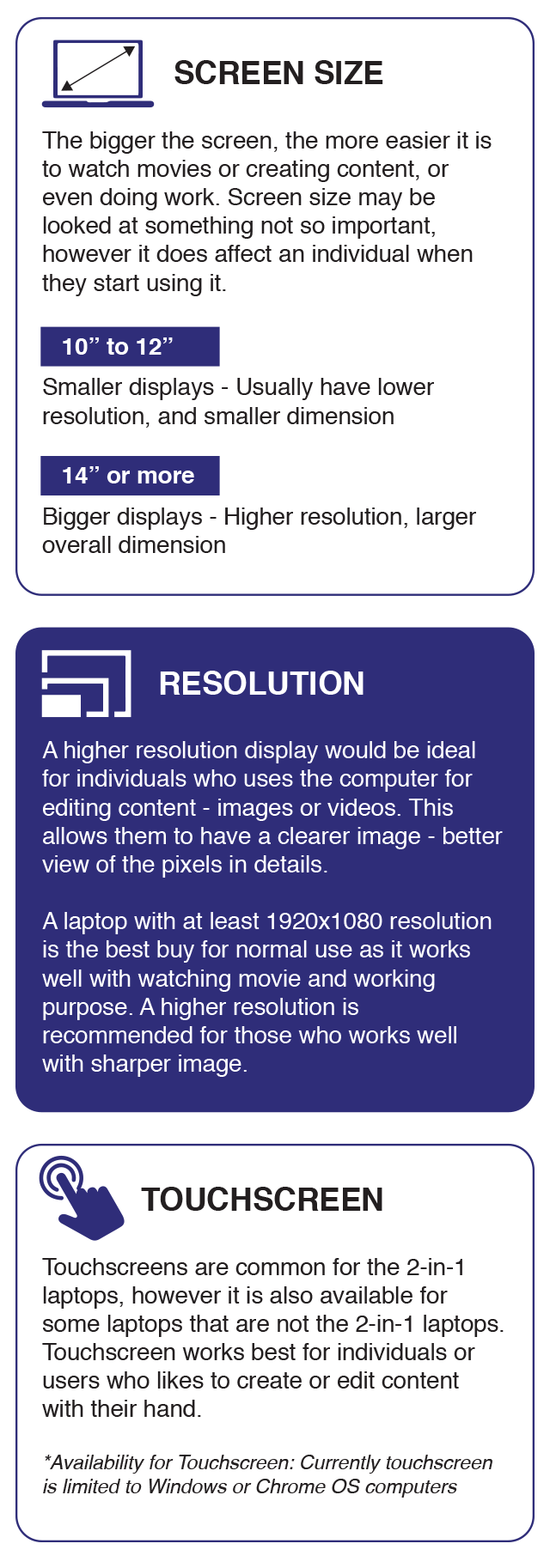
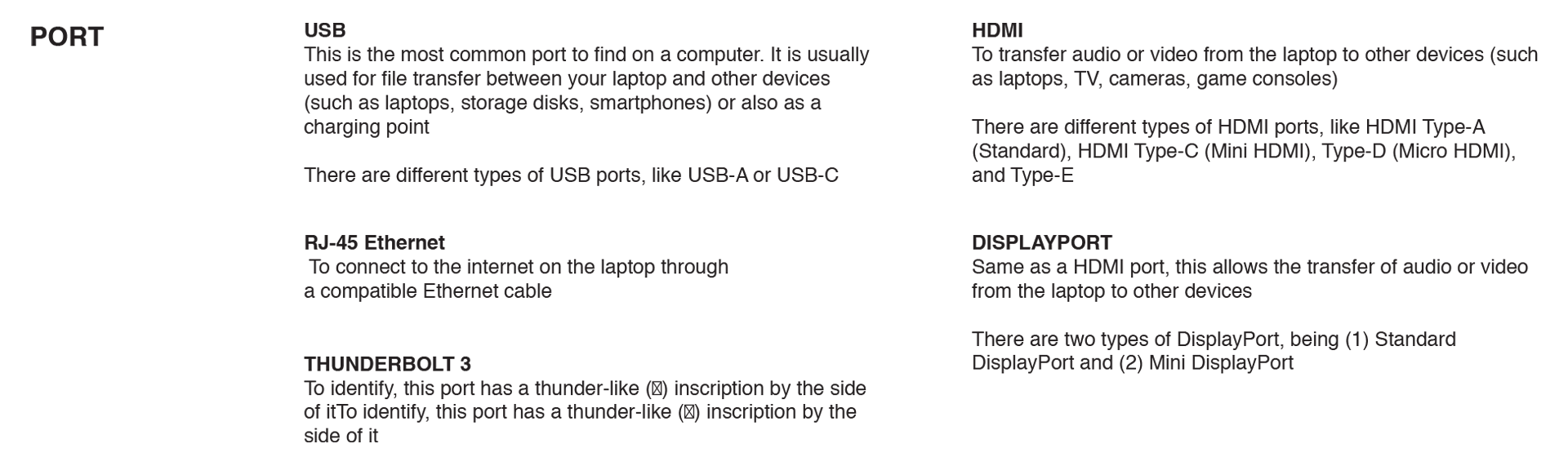
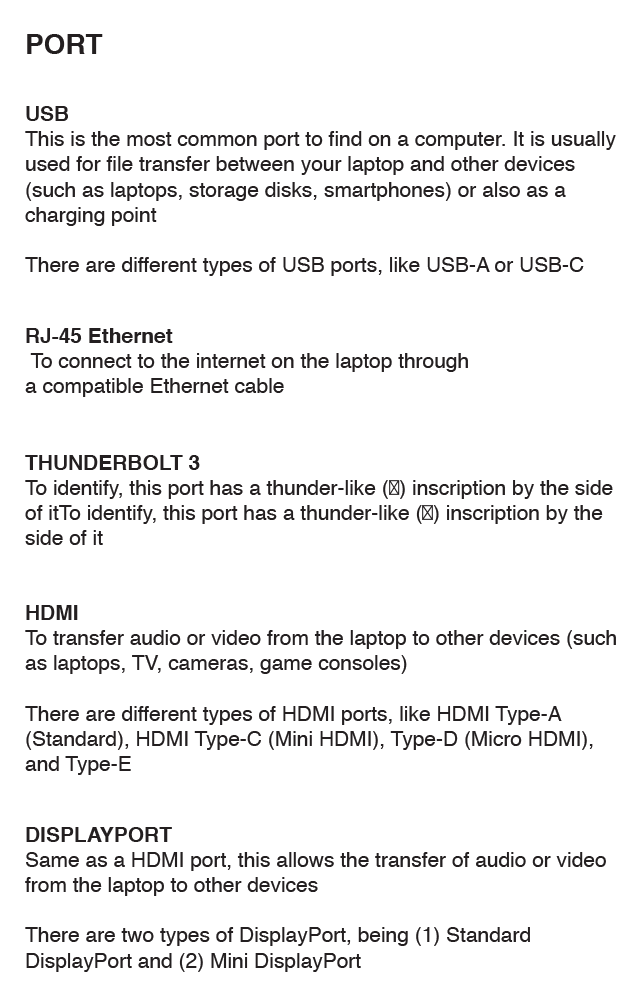
It is wise to check on the availability of ports on the laptop before purchasing it.
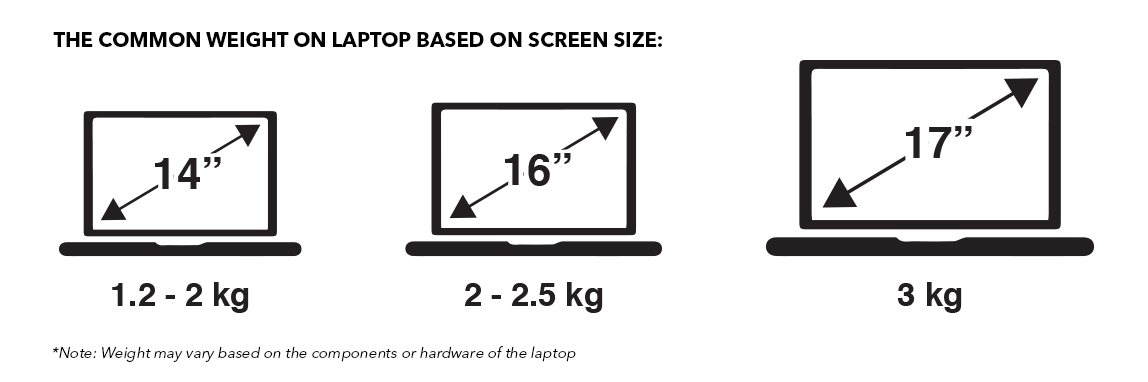
For a student or traveller, or basically someone who travels a lot with their laptop, it is wise to get a lighter laptop to ease movement. These laptops may be slightly more expensive to accommodate SSDs instead of HDDs to minimise on its weight and size, or it may have lesser storage overall.
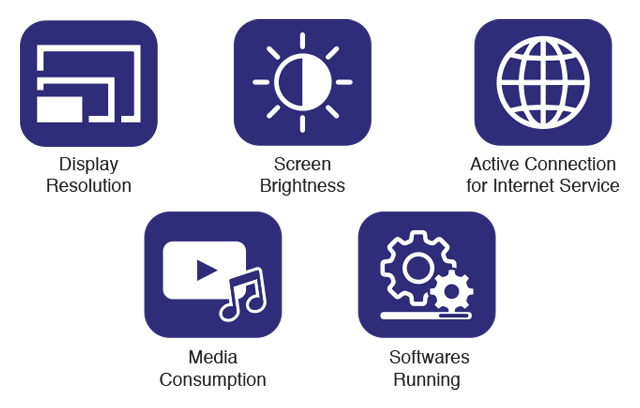
Since laptop are portable, battery life plays a role in identifying if it is worth it. However, it is important to know that laptop usage is a factor contributing to the long-lasting or fast-dying battery percentage. Checking on the battery size [milliampere-hours (mAh)] is vital to gather information on the battery life. Besides, keeping in mind that there are many other factors to a battery's life.

THE IMPORTANCE OF A LAPTOP
In today's world, technology is advancing quickly. It does not matter how technology-savvy an individual is, laptop has become a necessity to ease many activities, including office work, studies, gaming, entertainment, personal use (like communication, shopping, travel), as well as storing data and information. Laptops have similar function as to desktops, with only a couple of added functions. However, it is clearly seen that laptops are gaining more recognition and importance as compared to desktops - being a portable computer at one's fingertips.
PROCESSOR OR CPU (CENTRAL PROCESSING UNIT)
It acts as the brain of the computer and does most of the work. It is the most important hardware, when it comes to what the computer is capable of. The CPU would execute the action when an access or changing of data is required.
The two main and best processors are Intel and AMD. However, there is no one best processor as it all depends on the use of the laptop. If an individual just wants to browse the web and watch Netflix, there is no point of purchasing a high-end chip for a laptop. Nevertheless, processors should not be the only detail to look at, as there as many other factors contributing on whether a laptop is suitable for different groups of individuals.
In today's world, technology is advancing quickly. It does not matter how technology-savvy an individual is, laptop has become a necessity to ease many activities, including office work, studies, gaming, entertainment, personal use (like communication, shopping, travel), as well as storing data and information. Laptops have similar function as to desktops, with only a couple of added functions. However, it is clearly seen that laptops are gaining more recognition and importance as compared to desktops - being a portable computer at one's fingertips.
WHAT YOU NEED TO KNOW ABOUT HARDWARE – INSIDE A LAPTOP
PROCESSOR OR CPU (CENTRAL PROCESSING UNIT)
It acts as the brain of the computer and does most of the work. It is the most important hardware, when it comes to what the computer is capable of. The CPU would execute the action when an access or changing of data is required.
The two main and best processors are Intel and AMD. However, there is no one best processor as it all depends on the use of the laptop. If an individual just wants to browse the web and watch Netflix, there is no point of purchasing a high-end chip for a laptop. Nevertheless, processors should not be the only detail to look at, as there as many other factors contributing on whether a laptop is suitable for different groups of individuals.
In short, the heavier the load of the laptop, such as graphic cards, the faster the
processor
that is required.
GRAPHICS OR GPU (GRAPHIC PROCESSING UNIT)
It is a separate CPU dedicated to one task - generates all images you see on the screen. The better the GPU, the quicker the images appear, with lots of detail, and fast refresh rates.
As good as the GPU could be, it should work alongside with the laptop's CPU and RAM to deliver the best results. This is necessary for gamers or graphic designers for instance, who does video or image editing. A basic use of the laptop would not need a separate GPU from the one that is already built into the processor.
RAM (RANDOM ACCESS MEMORY)
This is where the CPU stores its files that it is working on, such as the operating system and any apps that is opened. It is a dedicated hardware for temporarily storing information for immediate use based on how much space the RAM could offer the laptop.
The more RAM that the laptop has, the more information or apps the laptop can run simultaneously - leading to a faster system performance. Despite having all hardwares integrating with one another to offer the best result, many individuals tend to have a bigger investment for the computer's RAM, which gives a greater difference in terms of performance than buying a faster processor. However, one should note to not dismiss the importance of a processor as well.
GRAPHICS OR GPU (GRAPHIC PROCESSING UNIT)
It is a separate CPU dedicated to one task - generates all images you see on the screen. The better the GPU, the quicker the images appear, with lots of detail, and fast refresh rates.
As good as the GPU could be, it should work alongside with the laptop's CPU and RAM to deliver the best results. This is necessary for gamers or graphic designers for instance, who does video or image editing. A basic use of the laptop would not need a separate GPU from the one that is already built into the processor.
RAM (RANDOM ACCESS MEMORY)
This is where the CPU stores its files that it is working on, such as the operating system and any apps that is opened. It is a dedicated hardware for temporarily storing information for immediate use based on how much space the RAM could offer the laptop.
The more RAM that the laptop has, the more information or apps the laptop can run simultaneously - leading to a faster system performance. Despite having all hardwares integrating with one another to offer the best result, many individuals tend to have a bigger investment for the computer's RAM, which gives a greater difference in terms of performance than buying a faster processor. However, one should note to not dismiss the importance of a processor as well.
STORAGE
The amount of internal storage on a laptop shows how much space it has to store data and information in total, inclusive of installed programs to downloaded movies or music. Being different from RAM, an unused app would not take space on the memory, but it does on the storage space.
Laptops would either use a solid-state drive (SSD) or hard disk drive (HDD), or both - being hybrid. Hybrid brings out the best of both sides. SSDs are much faster at reading and storing data as compared to HDD. However, SSDs cost much more per GB of storage than HDD, therefore it has its own advantages. Many laptops nowadays rely on SSDs.
It is important to choose a proper storage size before purchasing a laptop, as it would cost extra to get an external source as a storage. It is also possible to get a laptop with enough local storage and opt for the subscription for a cloud storage, other than a SSD or HDD.
WHAT YOU NEED TO KNOW ABOUT THE DESIGN – OUTSIDE A LAPTOP
DISPLAY
The amount of internal storage on a laptop shows how much space it has to store data and information in total, inclusive of installed programs to downloaded movies or music. Being different from RAM, an unused app would not take space on the memory, but it does on the storage space.
Laptops would either use a solid-state drive (SSD) or hard disk drive (HDD), or both - being hybrid. Hybrid brings out the best of both sides. SSDs are much faster at reading and storing data as compared to HDD. However, SSDs cost much more per GB of storage than HDD, therefore it has its own advantages. Many laptops nowadays rely on SSDs.
It is important to choose a proper storage size before purchasing a laptop, as it would cost extra to get an external source as a storage. It is also possible to get a laptop with enough local storage and opt for the subscription for a cloud storage, other than a SSD or HDD.
WHAT YOU NEED TO KNOW ABOUT THE DESIGN – OUTSIDE A LAPTOP
It is wise to check on the availability of ports on the laptop before purchasing it.
For a student or traveller, or basically someone who travels a lot with their laptop, it is wise to get a lighter laptop to ease movement. These laptops may be slightly more expensive to accommodate SSDs instead of HDDs to minimise on its weight and size, or it may have lesser storage overall.
Since laptop are portable, battery life plays a role in identifying if it is worth it. However, it is important to know that laptop usage is a factor contributing to the long-lasting or fast-dying battery percentage. Checking on the battery size [milliampere-hours (mAh)] is vital to gather information on the battery life. Besides, keeping in mind that there are many other factors to a battery's life.
What is Mesh WiFi?
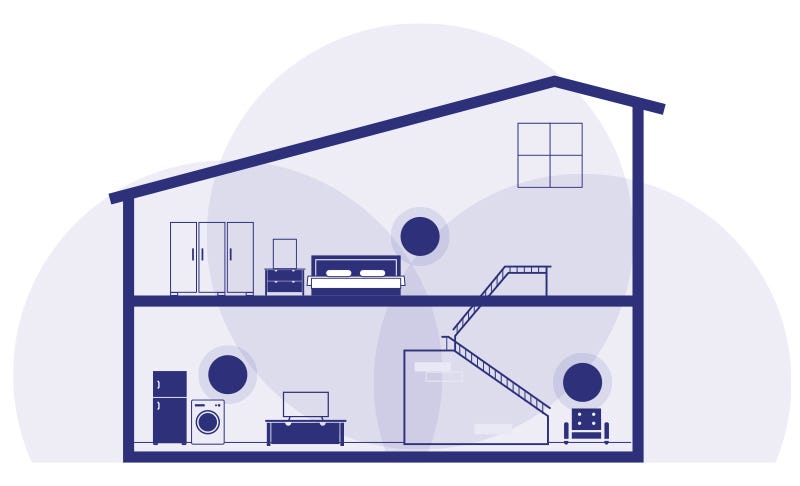
Mesh WiFi ensures that the whole house gets an uninterrupted WiFi
connection. It provides WiFi users with faster speeds, greater coverage,
and a more reliable connection.
One way to describe Mesh WiFi is that it has multiple access points (depending on how many is in a house), while traditional routers broadcast WiFi from a single point
One way to describe Mesh WiFi is that it has multiple access points (depending on how many is in a house), while traditional routers broadcast WiFi from a single point
Do You Need Mesh WiFi?
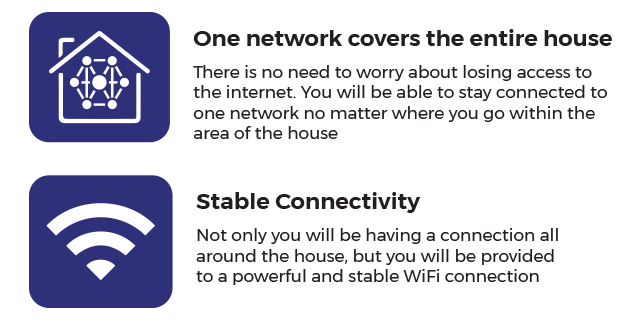
You would need at least one Mesh WiFi if you face such difficulties as shown below with your WiFi connection at home:Suffer from weak or incomplete WiFi coverage
What are the Benefits of Mesh WiFi?
You would need at least one Mesh WiFi if you face such difficulties as shown below with your WiFi connection at home:
What are the Benefits of Mesh WiFi?

Difference between Mesh WiFi and Range Extender
Offering the same purpose, which is to provide WiFi access throughout the house, it has one main difference between the two:
Mesh WiFi - Emits strong WiFi connection throughout the whole house
Range Extender - You would need to reconnect to a new network manually to continue having a strong WiFi connection
How Many Units Do You Need?
There is no limit on how many units you can add to your network. However, 3-pack itself works well for many users with an area of 7000 sq. ft. Mesh WiFi routers are built to fully cover large homes that are up to 6000 sq. ft., with two stories or more
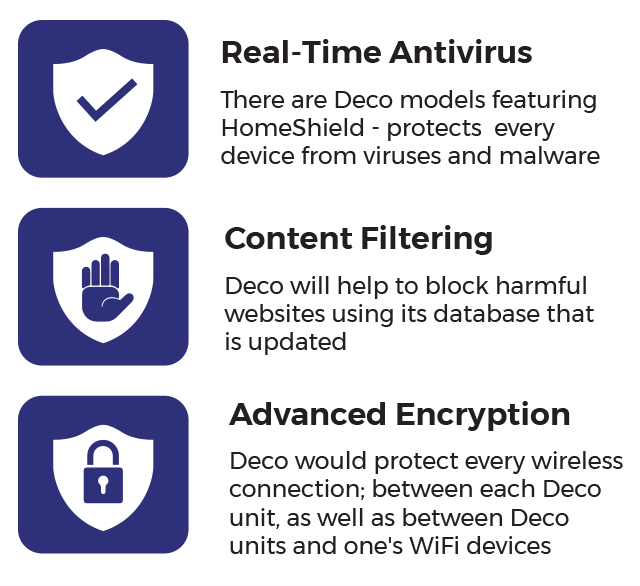
Deco Mesh WiFi Home Security
Offering the same purpose, which is to provide WiFi access throughout the house, it has one main difference between the two:
Mesh WiFi - Emits strong WiFi connection throughout the whole house
Range Extender - You would need to reconnect to a new network manually to continue having a strong WiFi connection
How Many Units Do You Need?
There is no limit on how many units you can add to your network. However, 3-pack itself works well for many users with an area of 7000 sq. ft. Mesh WiFi routers are built to fully cover large homes that are up to 6000 sq. ft., with two stories or more
Deco Mesh WiFi Home Security